First Steps in Computer Forensics: Securing Your Network

First Steps in Computer Forensics: Securing Your NetworkNo matter how secure your infrastructure is, sooner or later you will become a victim of a computer crime. Someone may point a DDoS (Distributed Denial of Service) attack at your services, may sniff your network, or may copy/delete confidential information. You may not even realize such a thing has happened. However, in an organized and secured network, you will be notified at the first signs of an attack. Now what? Your first normal reaction would be to stop the attack with whatever means possible. However, that may not be the best response. If you don’t possess the needed knowledge yourself, it might be a good idea to leave the crime scene as it is and let a computer forensics investigator deal with it. Let’s focus on the steps that the investigator would take. You may choose to take these steps alone but you will most likely not have all the necessary support tools and systems for that.

  1. Document the system – name, date, time, purpose, hardware, software, it all matters.
  2. Collect evidence – all the information about the attack should be securely taken off the target system. This is usually done through specific software that hashes all the information. This way, the information is legitimate and can be used as formal evidence for prosecution. The evidence that is usually collected includes active network connections, processes loaded into memory, and a copy of all the information on the disk with the respective creation, modification, and access values. The collector should be confident about the security of the system used for storage and analysis of the copied evidence. Only after this step, is it beneficial to unplug or shut down the affected system. If the affected system is saving logs on a remote server, copy them as well, although they are less likely to be compromised by the attack. In Linux, programs could still be running even after their files have been deleted. You can search for such programs with the command: file /proc/[0-9]*/exe|grep “(deleted)” . If you want to make a copy of this list use: /bin/dd if=/proc/filename/exe of=filename .
  3. Recreate the timeline of the attack – once all the information is copied on a secured workstation, the timeline of the attack can be recreated from the times of creation, modification, and access of all the files. This should be done before anything else, because the other steps can change the original times of the files. The timeline will show the last executed file, the last created/deleted folder, executed scripts, etc.
  4. Deeper analysis of the affected system – using the information collected in the previous steps, a deeper analysis can be performed of the system in order to find suspicious installations, creation or deletion of folders, and the like. Forensics investigators have specific tools for this step.
  5. File information restoration – the slack or unallocated space can be investigated for parts of files that, when combined, may indicate the time of deletion of files. It can be useful for the recreation of the steps of the attacker.
  6. Search – use all the information gathered so far to search for specific names, IP addresses, and file names, that can point you to the intruder.
  7. Report – no matter if the compromised system is your company’s or another’s, it is always good to document all your findings during the investigation. If it’s done right it can even be used in court.

Don’t make the mistake of not taking computer crimes seriously! In today’s digital world, computer crimes are just as serious as any other ones. Don’t hesitate to call a specialist if you’re not sure you can handle the investigation process alone. If your organization is big enough and your budget allows it, think about creating a Computer Security Incident Response Team which will be prepared for computer crimes and will have procedures and resources in place to handle them properly.

http://blog.monitis.com/index.php/2012/05/17/first-steps-in-computer-forensics/

Syndicated stories and blog feeds, all rights reserved by the author.

Read More

The Information about Linux Desktop from IBM

linux21 May 2009: IBM announced the results of a study conducted by the I.T. analyst firm Freeform Dynamics, commissioned by IBM, which showed that Linux desktops were easier to implement than IT staff expected if they targeted the right groups of users, such as those who have moderate and predictable use of e-mail and office tools

The research behind the report, “Linux on the Desktop: Lessons from Mainstream Business Adoption,” was designed, executed and interpreted independently by Freeform Dynamics. Feedback was gathered via an online survey of 1,275 I.T. professionals from the U.K., U.S., Canada, Australia, New Zealand and a spread of other countries across Western Europe and the Nordics. Ninety percent of the study’s respondents had direct experience with desktop Linux deployment in their business.

Those with experience of such migrations said that Linux on the desktop was best achieved when it was first targeted to groups of non-technical users. Transaction workers and general professional workers were seen as more than twice as likely to be primary targets for desktop Linux adoption than mobile and creative staff. A majority of the respondents indicated that Linux desktop deployments to these targeted groups was easier than anticipated.

“Some users care a great deal about their desktop computing environment and may be emotionally or practically wedded to Windows,” said Dale Vile, research director, Freeform Dynamics. “The trick is to avoid getting distracted by these, and focus on the users for whom the PC on their desk is simply a tool to get their job done. Migrating a general professional user who only needs to access a couple of central systems, an email inbox and light word processing is pretty straightforward.”

Key statistics of the study include:

71% of respondents indicated cost reduction as their primary driver for adoption.
35% stated the ease of securing the desktop was another primary driver
32% cited the lowering of overheads associated with maintenance and support in general were factors contributing to the benefit of desktop Linux adoption
Those with experience of Linux desktop rollouts are 50% more likely to regard non-technical users such as general professional users and transaction workers as primary targets for Linux
58% of those with prior experience of a Linux desktop rollout see general professional users as primary targets
52% of those with prior experience of a Linux desktop rollout see transaction workers as primary targets.
32% of those with prior experience of a Linux desktop rollout see power users as primary targets.
47% of respondents said usability was the main consideration when evaluating or selecting a desktop Linux distribution for use in a business environment

The study confirmed Linux on the desktop adoption is primarily driven by cost reduction. About twice as many of the respondents cited cost savings over security as the primary driver of why they’d adopt Linux on the desktop. Participants in the study indicated that both environments can be secured adequately — it’s just cheaper to secure a Linux desktop and maintain it that way.

“If a company is a ‘Windows shop,’ at some point it will need to evaluate the significant costs of migrating its base to Microsoft’s next desktop and continuing the defense against virus and other attacks,” said Bob Sutor, vice president of Linux and open source, IBM Software Group. “Savvy IT departments see the Linux desktop as a PC investment that actually saves money during this downturn. We see the recession fueling open source on the desktop.”

The user groups in the study were defined as:

IT operations/support staff
General professional users (relatively light and predictable use of e-mail, office tools, etc)
Transaction workers (mostly using enterprise applications in a routine prescriptive manner)
Other (non-IT) technical staff (e.g. engineers, technical designers/architects)
Office based power users (e.g. finance staff, marketing teams, knowledge workers, etc)
Highly mobile professional users (e.g. sales, roaming managers, etc)
Creative staff (non-engineering, e.g. graphic design)

For more information on IBM, you can visit http://www.ibm.com/think

Read More

PC-3000 for SCSI

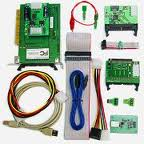
PC-3000 for SCSIPC-3000 for SCSI is a first-to-market professional hardware-software solution for testing, diagnosing the failures and recovering data from Hard Disk Drives with SCSI and SAS interfaces in tandem with Data Extractor SCSI.

  • SAS (Serial Attached SCSI) are supported.
  • SCSI-2, Ultra SCSI, Ultra2 SCSI, Ultra 160 SCSI, Ultra 320 SCSI is supported.
  • Original user-friendly interface similar to that one of PC-3000 for Windows.
  • PC-3000 for SCSI can work with 1 up to 15 Hard Disk Drives simultaneously; make tests and service operations for each of them and independently from all the other drives.
  • New PC-KEY2 (Power supplier) card can control power supply of one HDD.
  • Three external power sources of ATX standard, you can connect several HDDs to each of them. DBMS for resource storage – one of the most safe database of all existing ones.
  • PC-3000 for SCSI hardware-software product can function under these Operating systems: Microsoft Windows 98/ME, Windows 2000, Windows XP. Requirements to your PC hardware are determined by the requirements to the OS. SCSI adapter must be installed.
  • Know-how manuals with different methodologies of data recovery, recommendations on interchangeability of PCBs, succession of making hot-swap.

More about PC-3000 please refer to this post: Hard Drive Repair Tool PC3000 System

Read More