What a hard drive looks like?

 To many people, a hard disk is a “black box” of sorts—-it is thought of as just a small device that “somehow” stores data. There is nothing wrong with this approach of course as long as all you care about is that it stores data. It is hard to really to understand the factors that affect performance, reliability and interfacing without knowing how the drive works internally.

If you use your hard disk as more than just a place to “keep stuff”, then you want to know more about your hard disk. For those people who earn their butter and bread by retrieving data from a defect hard drive, it is necessary to know how the hard drives works know more the ticks of store data.

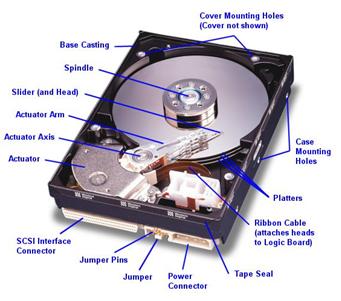
Fortunately, most hard disks are basically the same on the inside. While the technology evolves, many of the basics are unchanged from the first PC hard disks in the early 1980s. Lets have a look at the following pictures of a modern SCSI hard disk, with major components annotated from Western Digital Corporation):

(Original image � Western Digital Corporation)

We look at the various key components, discuss how the hard disk is put together, and explore the various important technologies and how they work together to let you read and write data to the hard disk. My goal is to help you really understand the design decisions and tradeoffs made by hard disk engineers, and the ways that new technologies are being employed to increase capacity and improve performance.

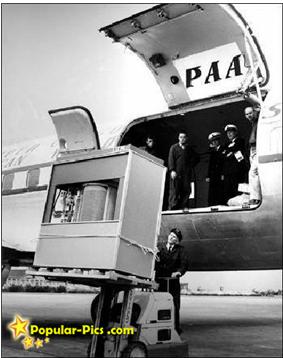
When the first HDD looked like? What was the capacity of it?
5MB Hard Disk in 1956
It’s a hard disk in 1956…. the Volume and Size of 5MB memory storage in 1956. In September 1956 IBM launched the 305 RAMAC, the first computer with a hard disk drive (HDD). The HDD weighed over a ton and stored 5MB of data. Let us start appreciating your 4 GB jump drive!

5MB Hard Disk in 1956 – Its a hard disk in 1956…. The Volume and Size of 5MB memory storage in 1956. In September 1956 IBM launched the 305 RAMAC, the first computer with a hard disk drive (HDD). The HDD weighed over a ton and stored 5MB of data.

Read More

Can I boot to the USB Personal Storage as the primary drive?

The Microsoft Windows operating system families (98SE,ME,2000,XP) do not support USB2 as a boot drive or primary system drive.

The Maxtor Personal Storage 160GB and above models are not supported as a boot drive for Macintosh operating systems because of Apple file system limitations. Some Macintosh platforms allow USB2 hard drives to function as the primary or boot drive. Check with Apple to see if your computer system supports booting to USB2 storage devices.

Read More

Norton Online Backup

Norton Online Backup Norton Online Backup automatically protect and remotely store your files at their secured data centers. Norton Online Backup also provides you convenience by giving you more ways to securely access and share your files anytime you have an internet connection.

Norton Online Backup Overview:
Storage: 25GB
Operating System: Windows 7 / XP/ XP Pro / Vista /Mac OS X v10.5+
Delivery: Download
Price: $49.99/Year (Protect up to 5 PCs)
Coupon Code: 15NORTONSTORE (Get 15% off)

Norton Online Backup Main Features:

  • Delivers easy-to-use, professional-grade, backup protection for your files
  • Lets you access your files from any Internet-connected computer
  • Makes transferring files between computers a breeze
  • Works with both Windows and Mac computers
  • Simplifies file sharing
  • Lets you search backup sets for specific files by keyword
  • Saves older versions of your backed up files

How does Norton Online Backup works:
Download and install Norton Online Backup client to get started protecting documents, music, videos and digital photos with automated online backup that’s easy to use.

Norton Online Backup Reviews:

Useful Links:

Low price on Amazon.com: $19.99 (Save $30.00. This is the cheapest price. Norton Online Backup 2.0 1User/25GB )

Read More

Free Backup Software: Macrium Reflect Free Edition

Free Backup Software: Macrium Reflect Free Edition Macrium Reflect – Create, burn, and back up disk images.

Software Name: Macrium Reflect Free 4.2 build 2952
Version: Publisher: www.macrium.com
Operating system: Windows XP/2003/Vista/7/2008

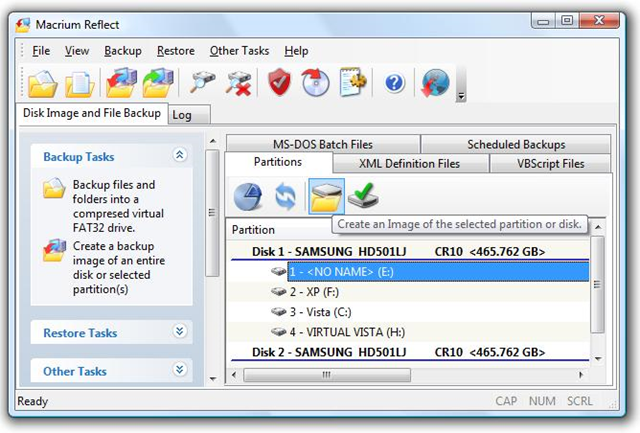
Macrium Reflect lets you backup your computer files or create complete images(Using this image you can easily restore data to an existing hard drive or put all your data on a new hard drive.) of your hard drive. Macrium is the best hard disk imaging and recovery solution for Windows XP/Vista/7, Server 2003 and Server 2008. Macrium Reflect supports backup to local, network and USB drives as well as burning to all DVD formats.

Macrium Reflect Free Edition Main Features:

  • Simple step by step operation
    Image and Restore using intuitive wizards and interfaces. Macrium Reflect integrates fully with Windows Explorer, a partition image can be created with a simple right click.
  • Automate the process
    With Macrium Reflect you can schedule Images to run at any time.
  • Integrated VBScript generator
    For ultimate backup control Macrium Reflect integrates with VBScript and WScript, enabling complete control of the backup process.
  • XML Backup definitions
    Save your backup definitions as industry standard XML files
  • Restore individual files and folders
    Create a ‘Virtual’ drive in Windows Explorer and recover selected files and directories using simple copy and paste operations.
  • Optimize
    You can create full, differential or incremental images to optimize backup speed and disk space requirements.
  • Windowless recovery
    If Windows no-longer boots, simply start your computer with the Macrium Rescue CD. This CD starts a compact version of the Linux operating system with a familiar mouse and graphical interface. You can then recover partitions and entire diskimages with just a few clicks of your mouse.

Macrium Reflect Free Edition Customer Reviews:

I just wanted to let you know how great your product is. I got a new SATA hard drive for my laptop and I tried to use ghost but it failed. I used your product with the Bart PE plugin and it was terrific. Very easy interface and worked perfectly. Thanks so much.

its fast easy to understand and works every time the interface is nice alot nicer than most back-up software of this type and it lets you see it working instead of guessing.

Macrium Reflect Free Edition Download:

Free Download: Macrium Reflect Free Edition

Note: Macrium Reflect Free Edition is for non-commercial home use.

Read More

Glossary of Western Digital Hard Disk Drive (Letter D)

Data Lifeguard Tools™
A set of software utilities that work in conjunction with embedded Data Lifeguard features to make hard drive installation, drive management diagnostics, and repair simple and worry-free.

Data Lifeguard™
A WD-exclusive data reliability feature that automatically detects, isolates, and repairs problem areas on a hard drive and prevents data loss.

data synchronizer
An electronic circuit that uses a clock signal to synchronize data.

data transfer rate
The rate that digital data transfers from one point to another, expressed in bits per second or bytes per second. Data transfer rate to disk (internal disk transfer rate) is expressed in megabits per second (Mb/s). Data transfer rate from buffer to host (transfer of buffered data) is expressed in megabytes per second (MB/s).

database
A collection of data stored on a computer system medium, such as a hard drive, CD-ROM, etc., that can be used for more than one purpose.

dedicated landing zone
The designated radial zone of a disk, usually at the inner portion, where heads are stored to avoid contact with data cylinders when power to the drive is off.

defect free
A term to describe recording surfaces that have no detectable defects.

defect management
A general method of eliminating data errors on a recording surface by mapping out known media defects. Defective areas are rendered inaccessible, so that subsequent operations write data only to non-defective locations.

desktop
A personal computer sized to fit on or under your desktop. WD internal hard drives are designed to fit into a desktop PC.

DHCP
Dynamic host configuration protocol. A protocol for assigning IP addresses to devices on a network. With dynamic addressing, a device can have a different IP address each time it connects to the network. In some systems, the device’s IP address even changes while it is still connected. DHCP also supports a mix of static and dynamic IP addresses.

differential SCSI
An electrical signal configuration that uses pairs of lines for data transfer, primarily in applications requiring cable lengths up to 82 feet (25 meters).

disk
A rigid platter, usually constructed of aluminum or Mylar® and with a magnetic surface that allows the recording of data.

disk controller
A chip or circuit that controls data transfers between disk and buffer. See also disk drive controller and interface controller.

disk drive controller
Hard disk drive controller electronics, which include the disk controller and interface controller. See also disk controller and interface controller.

disk transfer rate
Speed at which data is transferred to/from disk (platter); a function of the recording frequency. Typical units are bits per second (b/s), or bytes per second (B/s). A hard drive disk transfer rate increases from the inner diameter to the outer diameter of the disk.

distribution channel
Electronics distributors and retail chains that deliver electronic goods to end users through value-added resellers and retail stores.

DLNA
Digital Living Network Alliance. The group of consumer electronics, computing industry, and mobile device companies that sets standards for product compatibility, thus enabling users to share content in their home.

DMA
Digital Media Adapter. A device that gives home entertainment devices the ability to transfer media such as music, photos, and videos to and from other devices over the network.

DMA
Direct memory access. A process that transfers data directly to/from main memory, without passing through a CPU. DMA improves speed and efficiency by allowing a system to continue CPU processing while transferring data to/from a hard drive.

DNS
Domain Name Service. A system that allows a network name server to translate text host names into numeric IP addresses used to uniquely identify any device connected to the Internet.

DOS
Disk Operating System. A 16-bit operating system developed by Microsoft that was formerly the standard operating system for IBM-compatible PCs. DOS does not support multiple users or multitasking.

DPP
Data Path Protection. A feature that prevents possible electronic failures by preventing corruption of data on the hard drive.

DSA
Dual Stage Actuator. DSA is an improvement to the overall capability of the Servo system. It provides a mechanical benefit to improve the response time (higher bandwidth capability) of moving and maintaining the head position over the media.

dual interface
An external storage device with two interfaces available for connection to the computer.

dual-option backup
The ability to back up a drive either manually (on demand) or automatically.

DuraStep Ramp™
WD technology that locks the heads of a data disk to provide additional shock protection.

duty cycle
The time a component, device, or system is actually operating as compared to the time it is powered on; can be expressed as a ratio or percentage.

DVR
Digital video recorder.

Read More