How to Start a Data Recovey Business

What Procedure is Data Recovery assignment involved?

The following three issues are critical for your data recovery business. They includes the first (Technical Know-How) and the last two (Marketing Plan and Financial Resources) followed only if you can handle the first.

Technical Know-How: As this industry is professional, specialized know-how is required to handle the varied types of data recovery assignments. Generally speaking, there is 3+1 work flow applicable to all data recovery case:

Of all the stages, Stage 3–data retrieval, is the most widely spread and long-running; all data recovery companies, even end users, by downloading software, can handle mission of this stage easily. But according to SalvationDATA experts only 30 to 40 percent of all data recovery cases are simply stage 3 cases. The left percentage requires an ability to handle with the stage 2 and stage plus 1 issue.

Stage 2, disk data extraction, is also widely known and adopted as “disk imaging” by data recovery services nowadays. But to SalvationDATA, according our experience with lots of potential clients, they perform this important stage using ghosting tools designed for and work on good HDDs only, not the patient HDDs that are unstable or inaccessible because of media defects and instable head, which are common challenges of Stage 2 in practice. Even more, with those traditional imaging tools, the time involved and the ordinary user-level repeated-read access to the media bring a risk of damaging the disk and head, making data lost irretrievable.

Stage 1, drive diagnosis & restoration, is the primary stage in a broad sense data recovery flow but in fact deals with the deepest level in 3+1 broad sense data recovery flow. Unfortunately this Stage 1 is missing from most of the data recovery services or even noticed but was being done in a zigzag procedure or simply incorrectly due to lack of proper tools, meaning that they are putting away customers and profits. Our data has shown that up to 40% of data recovery cases have Stage 1 issues; and that IS NOT what going to happen that we can skip Stage 1 and perform Stage 2 and 3 and still to get certain percentage of data. You CAN NOT get anything in case you are not capable for the primary stage
Plus 1, it refers to Head or Platter Exchanger when encountered with motor seizure or head crash. This kind of problem often happens where the Drive is clicking or dropping from height. Concerning this issue, you need to replace the components and fix the mechanical malfunction first.

From above 3+1 work flow, you may get know the basic guidance of data recovery.
Then let’s move the following 2 factors which are relevant to your data recovery service.

Marketing Plan: It is the same as other service you are engaged in. It needs marketing plans and strategy. You should think more about customers’ convenience, satisfaction, price setting, and target market. If possible, you need advertising on different mediums too.

Financial Resources: Of course you need budget to get the business started before you benefit from your investment. You need facilities like a Clean Room and equipments to carry out the assignments. You also need to pay expensive technicians.

Supposing the Marketing and Financial investment are not the barriers to stop you, then you need think more about the facilities and data recovery equipments.

I have to admit that Data Recovery is a game for professionals and engineers to play, it is impossible to get started without any HDD Data Recovery Equipments provider.

SalvationDATA technology LLC, not unacquainted name in Data Recovery Industry, is the biggest and cost-effective solution provider all over the world. Their free technical support & Remote assistance and free updates, enhance the industry beginners’ confidence greatly and assist them to enter the industry as soon as possible.

Read More

WD mobile hard drive format

Case:After the customer moves the hard disk into the computer, the disk is recognized but the prompt is formatted, and it dare not operate blindly. Solution:Through the telephone contact, after understanding the reason with the senior engineer, he decided to take the computer to our company.Through the detection of engineers and determine the data can…

Read More

Latest Data Recovery Software: ReclaiMe

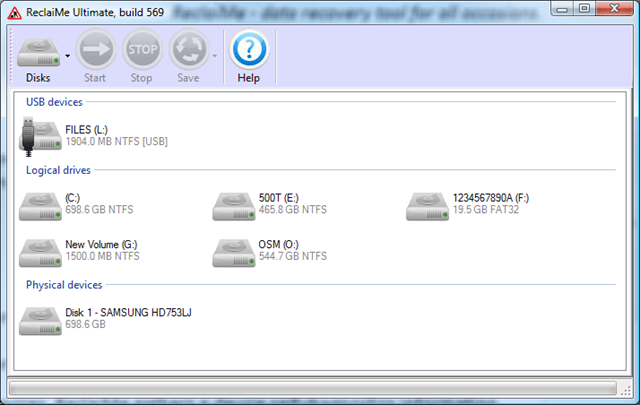
RedaiMe Data Recovery ReclaiMe is a powerful data recovery program for the various media types.

Price: Free to try (Recovery-disabled); $79.75 to buy
Operating system: Windows 2000/XP/2003/2008/Vista;
Version: Windows

About ReclaiMe Data Recovery:

ReclaiMe is a brand new product on the data recovery software market. It can recover deleted files, formatted disks and cards, data lost to a virus attack, system crash and whatnot. ReclaiMe has a number of significant advantages that distinguish it from the other data recovery utilities:

  • You can preview the recovered data even before the recovery is finished.
  • The preview feature allows you to evaluate the quality of the recovery before purchase.
  • ReclaiMe handles heavily damaged data well.
  • High speed data reading and processing from various media.
  • Possibility of creating a disk image file for the recovery.
  • ReclaiMe works with most media types (memory cards from the cameras, mobile phones, PDAs, MP3 players, hard drives and so on), as well as with disk image files.
  • The recovery process doesn’t require any complicated and tedious configuration of the program parameters.

You need ReclaiMe Data Recovery when:

  • you have accidentally deleted something (say, a digital photo from your memory card);
  • you have accidentally formatted your memory card;
  • you have lost your data because of accidental mishandling of your memory card – ejected the card from the working device or the battery exhausted and the camera turned off during the operation;
  • you have formatted your disk but now you want to reclaim your data back;
  • you think that there is a physical damage to your media. In this case ReclaiMe can create a disk image in the file, and then recover your data using this disk image file.
    Useful Links:
  • Web site: http://www.reclaime.com/
  • Free Download ReclaiMe Data Recovery now!
  • Buy ReclaiMe Data Recovery online.

Publisher profile:
In Volgograd city (Russia). ReclaiMe project has grown out from the software division of the famous data recovery company. The software there was good but excessively complex. So they set off on a separate project thinking that after all these years they finally need to create something people can actually use.

Read More

Data Backup Glossary (Letter A)

Data Backup Glossary (Letter A)ABARS
Aggregate group backup and recovery support (ABARS) is a backup system for MVS S/390 mainframes from IBM. ABARS performs data backup and recovery processes on a predefined set of data called an aggregate. During backup processing, the data is packaged as a single entity in preparation for taking it offsite. This enables the recovery of individual applications in user-priority sequence. The original design of ABARS was for use in disaster recovery, but is also used for transfer of workloads and remote distribution of data.

Active-active
Also called dual active, active-active is a network of independent processing nodes in which each node has access to a replicated database. This database access enables each node to access and use a single application. In an active-active system, all requests are load balanced across all available processing capacity. When a failure occurs on a node, another node in the network takes its place.

Agent
A program that performs one or more services (such as gathering information from the Internet), acting for or as a principal. In an EVault solution, an agent is installed on each server or device needing data protection. It requires no changes to underlying server hardware. The agent installs directly onto multiple operating system environments with minimal overhead. Communicating closely with the other two modules—EVault Director and CentralControl—the agent initiates ongoing, delta (or block-level change) processing of backup data. It also works to perform adaptive compression for more compact data transmission over LANs or WANs. The agent also can encrypt data prior to the data being sent.

Appliance
An intelligent device programmed to perform a single well-defined function, such as providing backup, file, web, network, or print services. Appliances differ from general purpose computers in that their software is normally customized for the function they perform, pre-loaded by the vendor, and not alterable by the user.

Archive(n.)

A disk, tape, or directory that contains files that have been moved off primary storage.
A file that contains one or more files in a compressed format. Due to the file’s content or age, it is infrequently accessed and can be stored in slower, lower cost devices.

(v.) To move files to a long-term storage medium for backup.

(adj.) In DOS systems, the archive attribute marks files that have been modified since the last backup.

Asynchronous replication
A replication technique in which data must be committed to storage at only the primary site and not the secondary site before the write is acknowledged to the host. Data is then forwarded to the secondary site as the network capabilities permit.

ATA disk on chip
ATA disk on chip (ADC) is a chip that contains both a solid state disk (SSD) and an ATAPI bus interface. ADC is housed in a 600 mm 32-pin DIP package and uses a standard ATA/IDE protocol. ADC is most commonly used in thin client systems, PDAs, and other small form factor devices.

Automated cartridge system
An automated cartridge system (ACS) is a storage and retrieval system, often used for library management. The ACS provides cartridge storage cells, transports, and a robotic mechanism to move cartridges between the cells.

Automated cartridge system library software
Automated cartridge system library software (ACSLS) is the software that controls an automated cartridge system (ACS).

Automatic backup system
An automatic backup system triggers backups by event—for example, a schedule point or a threshold reached—rather than by human action.

Automatic failover
The automatic substitution of a functionally equivalent system component for a failed one. The term failover is most often applied to intelligent controllers connected to the same storage devices and host computers. If one of the controllers fails, failover occurs, and the survivor automatically takes over its I/O load.

Availability
In computer systems and networking, the amount of time that a system is available during those time periods when it is expected to be available, often measured as a percentage of an elapsed year.


Read More

The contents of the 32G memory card of the mobile phone were accidentally deleted and recovered successfully

Case:Mr. Li’s mobile phone 32G memory card was accidentally deleted during the use of the card during use. There were important data in it. Since then, the memory card has not been operated, and the data recovery center data recovery is obtained. Solution:The engineer of the Data Recovery Center put the memory card through the…

Read More

Reinstalling the system mistakenly formatted the hard disk and merged it into one partition

Case:After reinstalling the system, I found that the previous partitions and data were gone, and it became a large partition.If such a failure occurs, customers should not rush to try to recover and repair.You should contact the company in time. Solution:After testing by engineers, this disk belongs to the error formatting when reinstalling the system….

Read More