Introduction
Brief architecture description, the main problems of modern hard disk drives, methods of HDD servicing and repair of simple malfunctions, SMART, passwords. The article is intended for data recovery specialists, technicians servicing computer equipment, network administrators and experienced users.
Drive construction
A drive consists of a mechanical part – head-and-disk assembly (HDA) and a printed circuit board (PCB). HDA acts as a case for all mechanical parts of a hard drive and contains one more chip performing the functions of a preamplifier/commutator. A PCB consists of several chips which control the mechanical parts, encode/decode data on magnetic surfaces and transfer the data through an external interface. PCBs are located outside HDA, in its lower part as a rule. In some hard drives, like the well-known Seagate Barracuda series, the controller has an additional metal cover protecting the electronic components from damage.
Mechanics
The whole construction is based on the drive case protecting sensitive mechanical parts from environmental influence. Inside it is filled with dust-free air though the air is not specifically purified; instead the assembly of the mechanical part is performed in a special workshop where air contains less than one hundred dust particles per cubic meter, i.e. in the so-called “class 100 clean room”.
HDA case has an opening blocked by a tight air filter. It is used to align air pressure inside the HDD and outside. Unfortunately, if a drive falls into water, the latter penetrates the inner space through that opening. Rotation of disks creates air flow circulating inside the case and constantly passes through one more filter separating dust if it somehow appears inside.
Drive case accommodates a pack of magnetic disks driven by a spindle motor, magnetic heads with their positioning system and a preamplifier/commutator enhancing the signal from the heads and switching between them.
A magnetic disk is a circular aluminum (rarely ceramic or made of special glass) plate with surface polished in accordance with the highest precision class for the sole exception of the parking zone, if it is present. In fact, high precision of disk surfaces and the heads causes them to “stick” to each other because of molecular attraction forces. To prevent that effect, manufacturers use special laser serrations in the zone of contact between drive heads and disks.
The disks demonstrate specific magnetic properties owing to their chrome oxide based coating (magnetically active substance) or cobalt layer applied using vacuum deposition. Such coating is characterized by high hardness and much greater wear resistance compared to previous models coated with a layer of soft varnish based on ferric oxides which could be easily damaged unlike modern coatings.
The disks are rotated by a special 3-phase electric motor. The stationary part contains three windings connected according to the “star” scheme, with a tap in the middle, and the rotating part is a permanent sectional magnet made of rare-earth metals. The requirement of beat reduction and high rotational speed values force the manufacturers to use special bearings in the spindle motor; these can be either ball bearings or improved fluid bearings (using special oil dampening impact loads and thus increasing motor durability). Fluid bearings are characterized by a lower noise level and produce practically no heat during operation. The number of revolutions per minute in modern IDE drives is equal to 5400 RPM or 7200 RPM; for modern SCSI drives it is 10000 RPM or 15000 RPM.
A magnetic head is also a sophisticated construction composed of numerous details. Those details are so small that they are manufactured using photolithography method just like chips. Working surface of the head’s ceramic case is polished with the same precision as the disk itself. Heads’ actuator is a flat solenoid coil of copper wire suspended between the poles of a permanent magnet and fixed at one end of a lever rotating around a bearing. The other end of the lever is connected to a bracket carrying magnetic heads. The bracket is spring-loaded with a certain effort which allows the heads to “fly” at a definite height above the disk surface; the said height is usually equal to tenths of micron.
The whole transport system moving the heads’ pack has been called Voice Coil by analogy with a loud-speaker cone. Its functional principle is similar to that of a common dynamic loud-speaker (i.e. copper coil in static magnetic field). Positioner’s coil is surrounded by a stator acting as a permanent magnet. When electric current of certain voltage and polarity appears in the coil the positioner starts turning to the corresponding side with respective acceleration; thus dynamic modification of current properties in coil allows positioning of magnetic heads to any location above disk surface.
Drive heads are fixed when a drive is powered-off (in the parking zone) with special latches. Magnetic and pneumatic latches are two most widely used types. A magnetic latch is a small permanent magnet fixed within drive case and attracting ferrous lug on the voice coil in the heads’ parking position. Pneumatic latch (or air lock) also fixes a positioner in the parking zone preventing its further movement. When the magnetic disks begin rotation the air flow thus generated deflects the “sail” of an air latch and unblocks the positioning system.
The electronic components inside HDA are limited to the preamplifier/commutator for the signal received from drive heads. It is located closer to the heads to minimize interference of external noise, right over the flexible cable from the heads to drive’s electronics. The same cable is connected to the voice coil and, sometimes, to the spindle motor; however, in most cases power supply of the spindle motor is implemented via a separate cable.
A HDA is usually linked to the PCB with two connectors. One of them is a three-phase center-tapped connector for the spindle motor while the other delivers signals from the preamplifier/commutator and voice coil.
Printed circuit board
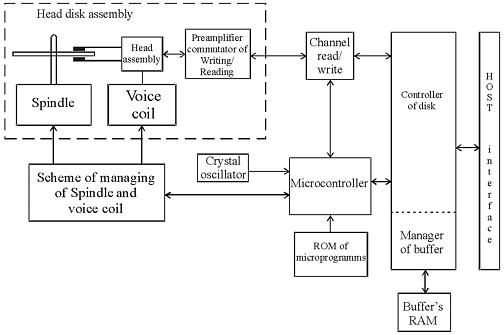
The circuit design of modern drives is characterized by the use of a few highly-integrated chips; their block diagram is represented in figure 1. 
Figure1. Circuit design of modern drives
As one can see in the picture, the whole layout is based upon four chips:
system controller chip including the read/write channel, disk controller and RISC control processor (microcontroller);
Flash ROM chip containing drive firmware;
chip controlling the spindle motor and voice coil;
ROM chip used as a cache buffer.
Further increase of integration is impossible due to some basic differences in the operational modes of the above functional parts.
The first system controller used in hard drives was a chip manufactured by Cirrus Logic. Its obvious breakthrough was manifested in the read/write channel, processor and disk controller integrated within one chip; however insufficiently developed methods of using such a microcircuit caused frequent malfunctions of Fujitsu drives belonging to series MPF3xxxAT and MPG.
A microcontroller has RISC architecture. As soon as power supply is switched on after the /RESET interface signal the drive reset circuit sends a RESET signal to microcontroller which executes its program from ROM running self-diagnostics, cleaning the working data area in memory and programming disk controller and all programmable chips connected to the internal data bus of an HDD. Then microcontroller polls internal signals used during drive operation and if it detects no emergency alerts, it starts the spindle motor. The next stage of firmware operation is internal testing of an HDD checking data buffer RAM, disk microcontroller and the status of microcontroller signals input from its port. Then the microcontroller begins analyzing the frequency of pulses waiting until the spindle motor reaches defined rotational speed. As soon as the necessary speed is reached, the controller begins to manipulate the positioning circuit and disk controller moving the magnetic heads to the area containing recorded firmware data and transfers it to buffer RAM for further operation. Then the microcontroller switches to readiness and awaits commands from HOST. In that mode a command received from the central processor initiates a whole chain of actions performed by all the electronic components in a HDD.
HDD read/write channel consists of a preamplifier/commutator (located inside HDA), read circuit, write circuit and a synchronizing clock.
Drive preamplifier has several channels, each being connected to its respective head. The channels are switched by signals from the drive’s microprocessor. Preamplifier also contains a recording current switch and recording error sensor, which emits an error signal if a short circuit or break occurs in a magnetic head.
Integrated reading/writing channel operating in the recording mode receives data from disk controller simultaneously with the recording clock frequency, performs data encoding, precompensation and transfers the data to preamplifier for writing to a disk. In the reading mode signal from preamplifier/commutator is transmitted to the automatic control circuit and then passes a programmable filter, adaptive compensatory circuit and pulse detector while being converted into data pulses sent to the disk controller for decoding and transfer through an external interface.
Disk controller is the most complicated drive component which determines the speed of data exchange between a HDD and HOST.
Disk controller has four ports used for connection to a HOST, microcontroller, buffer RAM and data exchange channel between it and HDD. Disk controller is an automatic device driven by microcontroller; from HOST side only standard registers of task file are accessible. Disk controller is programmed at the initialization stage by microcontroller, during the procedure it sets up the data encoding methods, selects the polynomial method of error correction, defines flexible or hard partitioning into sectors, etc.
Buffer manager is a functional part of disk controller governing the operations of buffer RAM. The capacity of the latter ranges in modern HDDs from 512 Kb to 8 Mb. Buffer manager splits the whole buffer RAM into separate sectioned buffers. Special registers accessible from microcontroller contain the initial addresses of those sectioned buffers. When HOST exchanges data with one of the buffers the read/write channel can exchange data with another buffer sector. Thus the system achieves multisequencing for the processes of data reading/writing from/to disk and data exchange with HOST.
Spindle motor controller regulates the motion of a 3-phase motor. It is programmed by the drive microcontroller. There are three control modes of spindle motor operation: the start mode, acceleration mode and stable rotation mode. Let us review the start mode. At power-up a reset signal is sent to the control microprocessor which performs initialization programming internal registers of spindle motor controller for a start. Drive controller generates phase switching signals; the spindle motor at that rotates at low speed generating self-induced electromotive force. Drive controller detects EMF and notifies the microprocessor which uses that signal for rotation control. In the acceleration mode microprocessor speeds-up phase switching and measures the rotational speed of the spindle motor until the speed reaches its rated value. As soon as the rated rotational speed is reached the controller introduces stable rotational mode. In that mode microprocessor calculates the time required for one revolution of the spindle motor based on the phase signal and adjusts the rotational speed accordingly. After relocation of magnetic heads from the parking zone the drive electronics begins tracking the stability of rotation using servo marks.
Voice coil controller generates the control current moving drive positioner and stabilizing it over a defined track. Current value is calculated by microcontroller on the basis of digital error signal for head position relatively to a track (Position Error Signal or PES). Current value in digital form is transmitted to CPU, the analogous signal thus received is enhanced and supplied to the voice coil.



 Digital images should be treated like any other important computer files: they should be archived and kept in a safe place. Most computers have built-in optical drives for burning compact discs and DVDs, both of which are reasonable archiving media. If you use optical discs for archiving, consider making two sets of backups—one for your home, and another to be kept in a remote location—just in case one set gets damaged.