Basic Information of Hard Disk Drive (Part III)

Firmware ‘overlay’ code are specific code functions. Why not just put all firmware code into one section? Well, since the RAM in the drive is a limited resource, they’ve put some code into ‘overlay files’, so that this specific code can be swapped into RAM when that specific function is needed. When the function is not needed, it can be swapped out of ram and some other function can be swapped into it again.

The firmware update files from Maxtor (I think the same goes for the other vendors) are not scrambled/encrypted/packed in anyway. In fact, you can find the exact same code in these files also in the ‘*.RPM’ files that PC3K produces for example.

Maxtor distributes their firmware file in a so called “.DMC” file. This DMC file is a package of 4 files, a ‘.Bxx’ file, a ‘.cxx’ file, a ‘.bbr’ file and a ‘.cbr’ file. Like I mentioned, this DMC container is not packed or scrambled in anyway. You can just cut the files out of it. The first 0x150 bytes of this file is the header. This header contains the four filenames, the offsets at which bytes in the package these files can be found, the length of the files and a checksum (not 100% sure about the checksum though). The ‘.bxx’ file is the biggest file and contains the overlay modules. You can find all code overlay modules by looking for ‘MO’ in the file. Right after this 2 byte string, you’ll find the hexadecimal overlay module ID. The ‘.bbr’ file contains the main firmware code. The last 2 files are very small, not sure what they contain, probably some checksums for the firmware and overlay modules.

Like said, the firmware code and overlay modules can also be found in the ‘*.RPM’ files of course, since this represents the firmware code on disk. So, you can look through these RPM files and scan for the ‘MO’ string to find any specific overlay module.

So, in short, if a vendor has released a firmware upload tool (most vendors have), BUT haven’t released a firmware file for your specific drive type, you could create your firmware, if you have the dumped modules (for example, obtained from this site). You could rip the main code and overlay modules and paste them into an existing DMC package. However, since I don’t know the checksum calculation and the meaning of these .cxx and .cbr files (probably checksums), you’d have to do more research, but in theory, it would be possible to create your own firmware files and flash them with such standard Vendor program to disk, so you wouldn’t need to buy an expensive tool like PC3000 (at least not if your sole goal was to upload a new firmware).

Of course, you could also create your own flasher program, instead of using the one supplied by the vendor. However, since vendors use specific versions of the ‘download microcode’ ATA command, you’d have to do research into this.

Furthermore, you could create a program that does EVERYTHING that a tool like PC3000 does. However, like pointed out, you’ll need very detailed information on the vendor specific ATA commands and the structure of the SA for that specific drive type and since this info is not made public by anyone, this means a LOT of work. “But hey, the PC3000 tool features a special hardware PCI card!” Yes, but as you’ll understand by now, you can think of that card as nothing more than a copy protection. They could have perfectly created the tool without it, but I guess they would have sold quite some copies less So you really can’t blame them for it, in fact, I think it’s quite a smart move to stop piracy.


Read More

A customer’s USB flash drive cannot be recognized and the data recovery is successful

Case:Kingston’s 2G U disk suddenly couldn’t recognize it. It couldn’t work after changing several computers, and it kept research data for several years. Solution:Based on customer description, preliminary judgment should be chip damage, and there is a chance of recovery.By detecting the damage of the main control chip of the U disk, the U disk…

Read More

Data Backup Glossary (Letter I)

iFCP
The Internet Fibre Channel Protocol (iFCP) allows an organization to extend Fibre Channel storage networks over the Internet by using TCP/IP. TCP is responsible for managing congestion control as well as error detection and recovery services. iFCP allows an organization to create an IP SAN fabric that minimizes the Fibre Channel fabric component and maximizes use of the company’s TCP/IP infrastructure.

Image

  • In computer science an image is an exact replica of the contents of a storage device (a hard disk drive or CD-ROM for example) stored on a second storage device.
  • Often used in place of the term digital image, which is an optically formed duplicate or other reproduction of an object formed by a lens or mirror.

Incremental backup
Any backup in which only the data objects that have been modified since the time of some previous backup are copied. Incremental backup is a collective term for cumulative incremental backups and differential incremental backups. Contrast with an archival, or full, backup, in which all files are backed up regardless of whether they have been modified since the last backup.

Information classification and management
Information classification and management (ICM) is a class of application-independent software that use advanced indexing, classification, policy and data access capabilities to automate data management activities above the storage layer.

Infrastructure
The combined set of hardware, software, networks, facilities, and other components (including all of the information technology) necessary to develop, test, deliver, monitor, control, or support IT services. Associated people, processes, and documentation are not part of an infrastructure.

Intelligent information management
Intelligent information management (IIM) is a set of processes and underlying technology solutions that enables organizations to understand, organize, and manage all sorts of data types (for example, general files, databases, and e-mails). Key attributes that define an IIM solution include the following:

Interrecord gap
The space between two consecutive physical blocks on a data recording medium, such as a hard drive or a magnetic tape. Interrecord gaps are used as markers for the end of data and also as safety margins for data overwrites. An interrecord gap is also referred to as an interblock gap.

Internet small computer systems interface
Internet small computer systems interface (iSCSI) is a transport protocol that enables the SCSI protocol to be carried over a TCP-based IP network. iSCSI was standardized by the Internet Engineering Task Force and described in RFC 3720.

IP storage
A technology being standardized under the IP Storage (IPS) IETF Working Group. Same as SoIP.

Read More

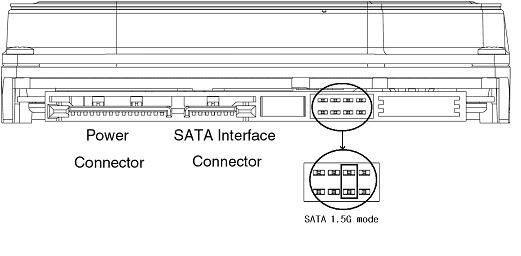
Samsung SpinPoint: Jumper to change transfer rate from 3 Gbps to 1.5 Gbps

Samsung SpinPoint SATA drives Jumper Setting: change transfer rate from 3 Gbps to 1.5 Gbps

Some computer motherboards with Serial ATA connections do not support SATA 3.0 Gbps performance. A jumper can be applied to Samsung SpinPoint Serial ATA drives that support 3.0 Gbps performance to slow the drive down to 1.5 Gbps so that these motherboards can support the drive.

Samsung SpinPoint,Jumper,transfer rate

Note: This jumper should be used only when the motherboard can not compensate for the drive’s faster performance.

Read More