Seagate GoFlex Satellite Mobile Wireless Storage

popular-science-bown-2011-selectionNovember 20, 2011 – Seagate announced the inclusion of GoFlex Satellite™ mobile wireless storage. With enough space for 300 HD movies and Wi-Fi access over 802.11 b/g/n and the powerful rechargeable lithium-polymer battery, this first for the hard drive industry provides the ability to stream a library of video, music, pictures and documents to up to three Wi-Fi enabled devices. Tablets and smart phones are wirelessly connected directly to the GoFlex Satellite drive by use of the free GoFlex Media™ app —available now on iTunes and the Android Market—or a web browser.

“For 24 years, Popular Science has honored the innovations that surprise and amaze us − those that make a positive impact on our world today and challenge our views of what is possible for the future. The Best of What’s New Award is the magazine’ s top honor, and the 100 winners − chosen from among thousands of entrants − represent the highest level of achievement in their fields.” said Mark Jannot, editor-in-chief of Popular Science.

“Seagate is thrilled to have been recognized by Popular Science for the annual ‘Best of What’s New’, the GoFlex Satellite™ mobile wireless storage takes an innovative approach to expand the limited capacity of mobile devices, such as Android™ tablets and phones as well as Apple® iPhone®, iPad® and iPod touch®. Now, people can easily catch up on all their missed TV shows or movies wherever and whenever they choose. It’s the perfect iPad or Tablet companion.”  said Patrick Connolly, vice president and general manager of Seagate’s Retail Branded Solutions.

The GoFlex Satellite drive is available for your holiday shopping from Seagate.com , Amazon and BestBuy.com for a manufacturer’s suggested retail price of $199.99.

Read More

2060-001102-003 WD PCB Circuit Board

HDD Printed circuit board (PCB) with board number 2060-001102-003 is usually used on these Western Digital hard disk drives: WD1200BB-00CAA0, DCM HSEHNA2AH, Western Digital 120GB IDE 3.5 Hard Drive; WD1200JB-00CRA0, DCM HSEHNA2AH, Western Digital 120GB IDE 3.5 Hard Drive; WD1200JB-75CRA0, DCM DSFHNA2AH, Western Digital 120GB IDE 3.5 Hard Drive; WD1200JB-75CRA0, DCM HSFANA2AH, Western Digital 120GB…

Read More

IDE Cables Bad?

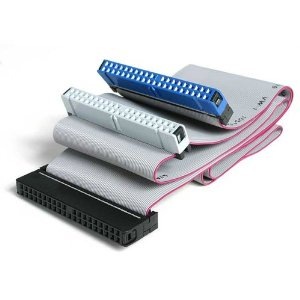
I have a ton of IDE cables and I can not get ANY drive set as slave to work on them except for 1! Are they ALL bad? I mean really! Some are the standard 18 in flat IDE cables. Some are 24in flat cables. 2 are 36in round IDE cables. None of these work. The only one that works is a 18in round IDE cable.

None of my drives will work set as a slave on the slave plug on the IDE cable. I can set one as slave and put it on the Master position and it works but not slave. Does this mean they are all bad?

IDE Cables Bad?

As far as I know there are no BIOS settings to create this so the cables must be bad, the one working confirming the others.

Read More

Solid State Drive Vs Hard Drive Vs USB Flash Drive

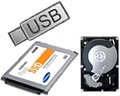
SSD vs USB Flash Drive vs Hard Drive Solid state drives (SSD): used in the enterprise are data storage devices that use non-moving fl ash memory technology rather than rotating magnetic disks or optical media. SSDs are compatible with traditional hard drive interfaces, such as SATA or SAS, and have a familiar hard drive form factor, such as 3.5-, 2.5- or 1.8-inch.

USB Flash Drive: consists of a flash memory data storage device integrated with a USB (Universal Serial Bus) interface. USB flash drives are typically removable and rewritable, and physically much smaller than a floppy disk. Most weigh less than 30 g (1 oz). Storage capacities in 2010 can be as large as 256 GB with steady improvements in size and price per capacity expected. Some allow 1 million write or erase cycles and have a 10-year data retention cycle.

USB flash drives are often used for the same purposes as floppy disks were. They are smaller, faster, have thousands of times more capacity, and are more durable and reliable because of their lack of moving parts. Until approximately 2005, most desktop and laptop computers were supplied with floppy disk drives, but most recent equipment has abandoned floppy disk drives in favor of USB ports.

USB Flash Drives Vs Solid State Drives
Both USB flash drives and SSDs use NAND fl ash memory. However, it’s the quality of NAND used—as well as the controller and interface involved—that separates a simple USB fl ash drive from an enterprise-class storage device, like those found in blade servers and external storage systems.

Solid State Drives Vs Hard Drives
Today’s SSDs are different from hard drives when it comes to data storage. SSDs are sophisticated storage devices that use non-moving memory chips, mostly non-volatile NAND fl ash, instead of the rotating magnetic disks found in hard drives. Hard drives can take the data directly from the host and write it to the rotating media. In contrast, SSDs can’t write a single bit of information without first erasing and then rewriting very large blocks of data at one time (also referred to as P/E).

Because SSDs and hard drives have different strengths in terms of effi ciency, they complement each other and can co-exist. SSDs deliver ultra-fast random data access (inputs-outputs per second, or IOPS, performance), low power consumption, small size and high physical resilience (due to no moving parts)— but they cost more. Hard drives provide fast sequential data access with high capacity, endurance and reliability at a much lower price.

Read More

The Best Online Backup Service Is The One That Fits Your Needs

Online Backup Service Where’s the best place to keep your backed-up data? Somewhere far, far away. Online backup services will keep your data safe no matter what sort of disaster strikes your local PCs.

Backing up your files online is a safe alternative to using regular backup software. However, finding the best online backup service to use isn’t as easy. This post will help you choose the best online backup provider that will be easy on your pocket book and provide the services you want.

Backing up your computer, or choosing an online backup service, is one of the most important things you do to insure data and files are not compromised or terminally lost during unforeseen “disasters,” which, according to “Murphy,” can, and probably will, happen at some point.

How do you shop for the best online backup service for you? How much space do your files need? How many user accounts do you have? Who can you trust with your data privacy? How much can you afford?

Security
Companies advertising more than one data center offer simultaneous duplicate backups of your data. Look for warnings from companies about your passkey. They will tell you if you lose your passkey, you cannot access your data backup account. This is a good thing! It lets you know that no one can randomly access your backup account without your permission or passkey.

Frequency
More is better. You want to get multiple copies of your data, automatically uploaded on a frequent and regular basis. The more often your data is backed up, the more protection you have in the event of a virus or irreparable corruption.

Space
Do you save lots of pictures, videos, and music? These files consume a lot of space and it might be more efficient to use an external hard drive to backup these. However, external and optical drives do not offer privacy and protection afforded by online (remote) backup services.

Price
“You get what you pay for.” Typically low-cost services take longer to complete the initial backup. They reduce their bandwidth costs by slowing your upload speed, which limits the amount of data that can be backed up, thus taking for, what can seem like forever, when you want to get done with maintenance and resume your processing.

Free Trial
If you have a high-speed Internet connection, and know what you want to back up and where the files are located, there are online backup services that allow you to try their service for free on a trial basis.

The best online backup service is the one that fits your needs and pocketbook.

Read More

Data Storage to Be Priority in 2012 – KeepItSafe

Data Storage,KeepItSafeThe storage, securement, access and management of growing volumes of information will mark 2012 within the technology sector, handled online backup and disaster recovery services provider KeepItSafe forecasts.

This rise in the quantity of data does mean using USB stays for data storage will decrease as companies be conscious of the potential risks that may include while using products.

USB sticks are small , portable, and therefore they are able to easily finish up lost or stolen. Research because of it security and data protection company Sophos also says two-thirds of 50 USB stays available on Australian trains and buses were have contracted adware and spyware and contained unencrypted details about their former proprietors.

Therefore, KeepItSafe stated, the virtualisation of servers and desktop computers increases as companies will have to adjust their storage systems to support the growing quantity of data they produce.

“It is impossible for service companies to carry on to handle storage needs with traditional local storage, this can pressure natural evolution to disaster-recovery solutions and data backup towards the cloud. This change won’t be viewed among large businesses but additionally among SMBs. stated Eoin Blacklock, controlling director, KeepItSafe.

“All companies will have to look for flexible, scalable and affordable storage options that may grow using their companies, putting data support high on the diary for 2012.”

Tape has become progressively hard to rely on and it is receding of favour with lots of organisations, Blacklock added.

Technology research and advisory firm Gartner discovered that 71pc of backup tape reinstates fail.

The escape from tape may also benefit companies financially, based on EMC Ireland?¡¥s country manager Jason Ward.

“Companies and public-sector organisations can significantly spend less and be slimmer by eliminating tape, that is cumbersome and susceptible to security breaches,” Ward stated.

Read More