
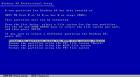
 Why do I get a “Volume size too big” error message during the installation of Windows XP?
You cannot format a volume larger than 32 GBytes in size using the FAT32 file system during the Windows XP installation process. Windows XP can mount and support FAT32 volumes larger than 32 GB (subject to the other limits), but you cannot create a FAT32 volume larger than 32 GB by using the Format tool during Setup. If you need to format a volume that is larger than 32 GB, use the NTFS file system to format it. Another option is to start from a Microsoft Windows 98 or Microsoft Windows Me Startup disk and use the Format tool included on the disk.

