

Tips for Learning Data Recovery Technology
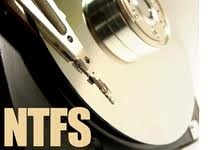
Tips for Learning Data Recovery TechnologyData Recovery, as the new field of IT industry has been gradually accepted by computer users. Computer began to be popular in our work and study. More and more people store the information on the computer. As the storage equipment’s production process and other factors, any kind of data storage media have the risk of data losing.

When encounters the data losing, the users’ storage data can’t be reconstructed. However the user needs the data urgently and don’t have enough time to rebuild it. Now using the data recovery technology to get the data back can greatly reduce the loss. This is why data recovery has large market.

Because the data recovery business had been developed in past few years, data recovery technicians are relatively lacking. There is a lot of data recovery software can be download by data recovery fans, so more emphasis on software use. The software is the combination of regular algorithms. However, the data loss reasons are different. Therefore, there is no one kind of data recovery software can recover the data loss in all the cases.

As the data recovery business’ rise, more and more organizations and individuals have taken part in data recovery training business. The result is the data recovery training levels are too different.

So what about the data recovery knowledge we should to learn? As we mentioned the data loss reasons are vastly different, the data recovery cases are too much to learn. So what we should to learn at the beginning?

We can’t visit a file just because some information is lost. If we know the data store principle and which information lost will cause the file lost, we can recover the file. In fact, data recovery software are also recover the data by using the data store principle (file system principle). However, the data recovery software just can deal with the relatively simple types of malfunctions.

Therefore, to study the data recovery technology, Microsoft’s file system (FAT16, FAT32, NTFS) must be very fluent. Just learn some common data recovery cases can’t master the data recovery technology. When learn the senior, you will find you don’t know how to do.
Read More

2060-701474-004 WD PCB Circuit Board

HDD Printed circuit board (PCB) with board number 2060-701474-004 is usually used on these Western Digital hard disk drives: WD10EACS-00C7B0, DCM HBRCHV2ABB, Western Digital 1TB SATA 3.5 Hard Drive; WD1000FYPS-01ZKB0, DCM HARCHV2ABB, Western Digital 1TB SATA 3.5 Hard Drive; WD10EACS-00C7B0, DCM HARCHV2AAB, Western Digital 1TB SATA 3.5 Hard Drive; WD10EACS-00ZJB0, DCM HBRCHV2AAB, Western Digital 1TB…

Read More

Compact Flash FAQs

Compact Flash What is Compact Flash?

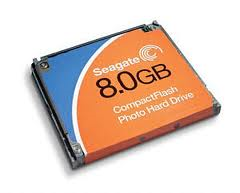
CompactFlash is the world’s smallest removable mass storage device. First introduced in 1994 by SanDisk Corporation, CF TM cards weigh a half ounce and are the size of a matchbook. They provide complete PCMCIA-ATA functionality and compatibility. Compact Flash is a small, removable mass storage commonly used in digital cameras.

Where will CompactFlash be used?
Several leading consumer electronics companies, including the CFA’s roster of founding members, are designing CF technology into next-generation products being developed for mass markets. The CFA expects CF technology will be widely used in such products as portable and desktop computers, digital cameras, handheld data collection scanners, cellular phones, PCS phones, PDAs, handy terminals, personal communicators, advanced two-way pagers, audio recorders, monitoring devices and set-top boxes. CF technology offers all of these applications new and expanded functionality while enabling smaller and lighter designs.

What is the difference between Type I and Type II?
Type I is 3.3mm thick, while Type II is 5mm thick. A CF Type II device will not fit in a Type I slot.

How do I format my Compact Flash drive?
Formatting a Compact Flash drive can be accomplished several ways. The most common method of formatting a Compact Flash drive is within the device in which the Compact Flash drive will be used. This will ensure a device compatible format and the best overall performance.

How do I interface the CF drive with my PC or Mac?
Compact Flash drives are connected to desktop/laptops computers through flash memory card readers. A typical card reader will contain multiple flash memory slots to accommodate the different types of memory. The card readers are most commonly attached to the computer via a USB or IEEE 1394 (FireWire) interface cable.

Do I need drivers for my OS?
Compact Flash drives do not require drivers. However, when the drive is attached through a card reader, the proper drivers for the card reader must be installed before the drive can be accessed.

Can I use this in my PDA? Does this drive require drivers?
The Compact Flash drive can be used in any PDA that will support Compact Flash Type II drives with high capacity. This is not a supported hardware environment.

While many PDA operating systems do not require drivers, some of the older operating systems, such as Windows CE, will require a driver before the drive can be accessed.

Can I install an OS onto this drive?
Depending on the operating system in use, it may be possible to install an OS onto the Compact Flash drive. Since this is not the intended purpose of the drive, the performance may be less than desired and no support will be provided.

What is the speed of my Compact Flash card?
Solid state CF memory cards are differentiated by a speed number:

Compact Flash Speeds
Speed
Kbytes/s
Mbytes/s
1
150
0.15
4
600
0.6
12
1800
1.8
24
3600
3.6
40
6000
6
60
9000
9
80
12000
12

What is the difference between FAT16 and FAT32, why do cards greater than 2GB require FAT32?
File Allocation Tables (FAT) are like a table of contents to your data. Prior to Windows 98, 16-bit FATs limited partitions to 2.1 Gbytes. The newer 32-bit FAT is capable of huge partitions up to two Tbytes (terabytes). Many digital cameras only support 16-bit FAT (FAT), newer cameras and high-end professional cameras usually support 32-bit FAT (FAT32). Check your camera’s manual or support information to determine if your camera supports FAT32 (memory larger than 2.1Gbytes).

Read More

Raid Data Recovery Softwares

1. RAID Reconstructor
Company: Runtime Software
Supported RAID Type: RAID 0, RAID 5
Supported Working Modes: Automatic Analysis

Runtime’s RAID Reconstructor will help you recover data from broken: RAID Level 5 Array consisting of 3 to 14 drives, RAID Level 0 Array (Striping) consisting of 2 to 14 drives. Even if you do not know the RAID parameters, such as drive order, block size and direction of rotation, RAID Reconstructor will analyze your drives and determine the correct values. You will then be able to create a copy of the reconstructed RAID in a virtual image (.vim), an image file (.img) or on a physical drive.

2. DiskInternals Raid Recovery
Company: DiskInternals Data Recoverysoftware
Supported RAID Type: RAID 0, 1, JBOD, RAID 5, and 0+1
Supported Working Modes: Automatic Analysis

Recover corrupted RAID arrays in a fully automatic mode. Raid Recovery is the first tool to automatically detect the type of the original RAID array while still allowing for fully manual operation. Raid Recovery is no doubt a highly valuable tool for users of all types of RAID arrays, whether hardware, native, or software. The drag-and-drop user interface allows specifying parts of the RAID array by simply dragging and dropping icons representing the disks.

3. Quick Recovery RAID
Company: Unistal Immortalizing Information
Supported RAID Type: RAID 0, RAID 5
Supported Working Modes: Manual Analysis

Quick Recovery RAID is a do-it-yourself non-destructive raid data recovery software. There are just two steps to perform the complete operation. Analysis, Select & Save. Analysis is the most important aspect of data recovery. Quick Recovery RAID’s unique Guided File Excavation Technology (GFETCh) helps in locating files and folders lost behind overwritten partitions too.

4. RAID Recovery Presentation
Company: R-Studio
Supported RAID Type: RAID 0, RAID 1, RAID 5
Supported Working Modes: Manual Analysis

R-Studio detects and treats valid software or hardware RAIDs as regular drives/volumes. But what to do if you have only drives or drive images of a faulty RAID? R-Studio can still help you to get the data back provided that the drives necessary for the RAID to operate are working or you have the images of those drives. The number of drives enough to get data back depends on the RAID layout. For example, for a mirror (RAID 1) of two drives, at least one must be valid, whereas for a RAID5 of 3 disks, the number of valid drives should be two.

5. RAID recovery
Company: Zero Assumption Recovery
Supported RAID Type: RAID 0,  RAID 5
Supported Working Modes: Manual Analysis

This tutorial describes the data recovery procedure used to recover a RAID0 or RAID5 array if the controller failed and the array parameters are lost Windows software-based RAID configuration data is damaged.

6. Getway Raid Recovery

Company: Getway Recovery LTD
Supported RAID Type: RAID 0, Raid 5,Raid 5E,Raid 5EE,Raid 6
Supported Working Modes: Smart Mode,Manual Mode,User-define Mode

Getway Raid Recovery is the professional raid recovery software which can extract data from multiple Hard disks in a RAID system, and rebuild the correct data. It can get data back from various types of arrays, including RAID 0, RAID 5, RAID 5E, RAID 5EE and RAID 6.

Read More

2060-701310-004 WD PCB Circuit Board

HDD Printed circuit board (PCB) with board number 2060-701310-004 is usually used on these Western Digital hard disk drives: WD4000YR-01PLB0, DCM HBACAJAH, Western Digital 400GB SATA 3.5 Hard Drive; WD4000YR-01PLB0, DCM HCACAJAA, Western Digital 400GB SATA 3.5 Hard Drive; WD4000KD-00NAB0, DCM HCHCAJCH, Western Digital 400GB SATA 3.5 Hard Drive; WD4000YR-01PLB0, DCM HCHCAJAH, Western Digital 400GB…

Read More