Glossary of Samsung Hard Disk Drive (Letter G, H, I)

Samsung Hard Disk Drive Glossary Gigabyte (GB)
1 Gigabyte = 1,073,741,824 digital bytes / 1,000,000,000 decimal bytes, a unit of measure for data

Hard Error
a data error which is not able to be overcome when the disk is reread, it occurs repeatedly at the same location on the media, indicating a defect in the surface

Hardware
computer equipment (as opposed to the computer programs and software)

HC
High-speed CMOS)

HDA
Head Disk Assembly

HDD
Hard Disk Drive, magnetic storage device

Head crash
Occurs when a head and disk accidentally touch, thereby damages the media (and subsequently the data)

Head Landing Zone
Area on the media which is dedicated to head takeoff and landing, no data is recorded in this area

Head positioner
(see Actuator)

Host
the computer system that the drive is integrated into

Hot swap
replacement of hard drives, whilst computer is in operation with zero downtime

Host adapter
a plug-in board or circuitry on the motherboard that acts as the interface between a computer system bus and the disk drive

IC
Integrated Circuits. IC’s are arrays of electronic components such as transistors, diodes, resistors built from a single piece of semiconductor material. Huge numbers of components (millions) can be placed upon a single chip, the external connections being made via the pins on the IC package

IDE
Integrated Drive Electronics, a hardware interface that allows peripheral devices to be attached to a PC

IDE Controller
The controller translates commands from the computer into something that the hard drive understands

Interface
transmitters/receivers that establish links between various parts of a computer and facilitate the exchange of data between these components (e.g. IDE, EIDE, SCSI, and for notebooks PCMCIA). The way the drive and host communicate with each other. It is a standard defined by industry organisations

Interleave factor
the number of sectors that pass beneath the heads before the next sector arrives (a means to optimise performance of a drive)

Internal Transfer rate
the speed at which data is transferred to and from the media, reflected in millions of bits per second (Mbits/second)

Inside Diameter
smallest radius recording track on a platter

Inside Diameter
smallest radius recording track on a platter

I/O
Input/Output

ISA
Industry Standard Architecture

ISO

International Standards Organisation, sets standards for computer industry

ISO-9660
a data format designed by the ISO in 1984

Read More

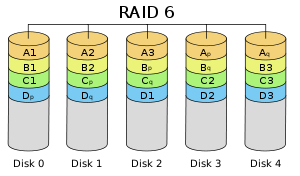
Raid Level 6

Striped set with dual distributed parity. Provides fault tolerance from two drive failures; array continues to operate with up to two failed drives. This makes larger RAID groups more practical, especially for high availability systems. This becomes increasingly important because large capacity drives lengthen the time needed to recover from the failure of a single drive. Single parity RAID levels are vulnerable to data loss until the failed drive is rebuilt: the larger the drive, the longer the rebuild will take. Dual parity gives time to rebuild the array without the data being at risk if a (single) additional drive fails before the rebuild is complete.

Raid Level 6
Advantages

  • RAID 6 is essentially an extension of RAID level 5 which allows for additional fault tolerance by using a second independent distributed parity scheme (dual parity).
  • Data is striped on a block level across a set of drives, just like in RAID 5, and a second set of parity is calculated and written across all the drives; RAID 6 provides for an extremely high data fault tolerance and can sustain multiple simultaneous drive failures
  • RAID 6 protects against multiple bad block failures while non-degraded
  • RAID 6 protects against a single bad block failure while operating in a degraded mode
  • Perfect solution for mission critical applications

Disadvantages

  • More complex controller design
  • Controller overhead to compute parity addresses is extremely high
  • Write performance can be brought on par with RAID Level 5 by using a custom ASIC for computing Reed-Solomon parity
  • Requires N+2 drives to implement because of dual parity scheme

Recommended Applications

  • File and Application servers
  • Database servers
  • Web and E-mail servers
  • Intranet servers
  • Excellent fault-tolerance with the lowest overhead

RAID 6 VS RAID 5

RAID 6
In complex arrays (12-24 drives), RAID 6 applications would be a preferred choice due to the fact that Serial ATA drives used in the arrays have a lower duty cycle and may be more likely to fail in 24/7 or business-critical applications.

Raid 5
In small arrays (4-12 drives), RAID 5 applications can quickly repair a failed drive and restore lost data-without taking down the array. It’s perhaps the most cost-effective, fault-tolerant data protection solution currently available for small storage devices.

Pro
Raid 6
Designed for tolerating two simultaneous HDD failures by storing two sets of distributed parities.

Raid 5

  • Simplified hardware implementation
  • A matured industry standard

Con
Raid 6

  • For RAID 6, one needs a more complex system with a method for encoding, as well as XOR calculations. For that, one really needs hardware acceleration, otherwise the performance suffers.
  • Uses 2 drives for parity

Raid 5

  • The risk of simultaneous drive failures grows in proportion to the drive array and can increase if customers purchase all of the disks in an enclosure at one time.
  • If the system finds a faulty sector on another drive during this degraded state (one drive down, spare drive being rebuilt), the RAID 5 system would be unable to restore the data onto the spare drive, resulting in data loss.

Recommended Configuration
Raid 6
Disk array consists of 12 disks or more

Raid 5
Disk array consists of 10 disks or less

Recommended Solutions

Raid 6

  • Desktop: EnhanceRAID T8
  • Rackmount: EnhanceRAID R14; UltraStor RS16

Raid 5

  • Desktop: EnhanceRAID T4HCR, T5,T8
  • Rackmount: EnhanceRAID R4,R6,R8; UltraStor RS8 or RS2080

Raid 6 Rebuild Software

Read More