Avoiding Storage System Failure?

Reduce or Eliminate the Impact of Storage System Failures
Storage systems have become their own unique and complex computer field and can mean different things to different people. So what is the definition of these systems? Storage systems are the hardware that store data.

For example, this may be a small business server supporting an office of ten users or less—the storage system would be the hard drives that are inside of that server where user information is located. In large business environments, the storage systems can be the large SAN cabinet that is full of hard drives and the space has been sliced-and-diced in different ways to provide redundancy and performance.

The Ever-Changing Storage System Technology
Today’s storage technology encompasses all sorts of storage media. These could include WORM systems, tape library systems and virtual tape library systems. Over the past few years, SAN and NAS systems have provided excellent reliability. What is the difference between the two?

  • SAN (Storage Area Network) units can be massive cabinets—some with 240 hard drives in them! These large 50+ Terabyte storage systems are doing more than just powering up hundreds of drives. These systems are incredibly powerful data warehouses that have versatile software utilities behind them to manage multiple arrays, various storage architecture configurations, and provide constant system monitoring.
  • NAS (Network Attached Storage) units are self-contained units that have their own operating system, file system, and manage their attached hard drives. These units come in all sorts of different sizes to fit most needs and operate as file servers.

  • For some time, large-scale storage has been out reach of the small business. Serial ATA (SATA) hard disk drive-based SAN systems are becoming a cost-effective way of providing large amounts of storage space. These array units are also becoming mainstream for virtual tape backup systems—literally RAID arrays that are presented as tape machines; thereby removing the tape media element completely.

    Other storage technologies such as SCSI, DAS (Direct Attached Storage), Near-Line Storage (data that is attached to removable media), and CAS (Content Attached Storage) are all methods for providing data availability. Storage Architects know that just having a ‘backup’ is not enough. In today’s high information environments, a normal nightly incremental or weekly full backup is obsolete in hours or even minutes after creation. In large data warehouse environments, backing up data that constantly changes is not even an option. The only method for those massive systems is to have storage system mirrors—literally identical servers with the exact same storage space.

    How does one decide which system is best? Careful analysis of the operation environment is required. Most would say that having no failures at all is the best environment—that is true for users and administrators alike! The harsh truth is that data disasters happen every day despite the implementation of risk mitigation policies and plans.

    When reviewing your own or your client’s storage needs, consider these questions:

  • What is the recovery turn-time? What is your client’s maximum time period allowed to be back to the data? In other words, how long can you or your client survive without the data? This will help to establish performance requirements for equipment.
  • Quality of data restoredIs original restored data required or will older, backed up data suffice? This relates to the backup scheme that is used. If the data on your, or your client’s storage system changes rapidly, then the original data is what is most valuable.

  • How much data are you or your client archiving?Restoring large amounts of data will take time to move through a network. On DAS (Direct Attached Storage) configurations, time of restoration will depend on equipment and I/O performance of the hardware.

  • Read More

    How can IT industry survive in the Financial Crisis?

    Fact sheet: IT Industry is affected by the Financial Crisis

    On Sept 30 2008, Steve Ballmer, CEO of Microsoft spoke at a news conference in Norway “We have a lot of business with the corporate sector as well as with the consumer sector and whatever happens economically will certainly effect itself on Microsoft,” he told Reuters.

    “I think one has to anticipate that no company is immune to these issues,” he said,

    Meantime, stock price of Apple dropped 40% during 6 weeks. On the other hand, according to the Forrester’s survey(a research company based in USA), nearly 43% company cut down the budget on IT to deal with the financial crisis, and more than 49% IT dept in financial industry has the same planning.

    Furthermore, from the majority IT Company’s third quarter Financial Report, we can see the whole industry meet a large decline in sales; it marks that the winter for IT industry coming.

    Why financial crisis affect IT industry?

    As we know, financial industry is the most important factor in the economy development. When financial organization suffered a great loss, the financial crisis will become credit crisis. It means currency circulation crisis, then it’s very difficult for us to borrow money from bank. Without the support from financial organizations, a large amount of companies will meet a financial shortage and have to cut down the budget.

    Secondly, due to the shrinking discretionary spending, people can not figure out the trend of Financial Crisis and no one can say how much it will affect our business and life. The so corporations and individuals keep their pocket tight and wait and see; it is going to affect business investment on IT products consumer spending.

    Thirdly, each industry is connected and affected by the economic structure. Since the bankruptcy of banks and financial organizations, how can IT industry be immune from this crisis but ignoring the interactional linkage?

    Is there any solution for IT Firms to survive from the financial crisis?

    The answer is absolutely yes. Those are “innovation in technology, switch or begin into new business sector” can definitely survive and grow their business, though the financial crisis took all us to a predicament.

    Nevertheless, Crisis not only gives us challenge but also Opportunity. Challenge and Opportunity are twins and often appear simultaneously.

    Let’s analyze the current situation in IT Industry(for a primer on IT education, Since the shrinking purchase power, most companies would prefer to maintain and repair their IT hardware instead of buying new ones. For the IT service/Repair Firms, they will not decrease but get more business.

    However, we can not ignore the crisis and wait passively. We have to expand our business arrange and survive from it.

    For example, IT firms can invest and start new business in IT industry, such as computer application service, computer maintenance data backup/recovery and etc.

    Along with the proliferation of computers in business, the demand for various incidental IT services is increasing. Data recovery service is one of these incidental services and the most promising one.

    Why Data Recovery is a most promising service for IT firms?

    Firstly, Data loss not only means a large sum of cost wasting for companies. It also hampers routines and slows down development of enterprise. So if there is any way to rescue the data and avoid the loss, all companies are willing to accept and buy the service.

    Secondly, IT firms have one unique advantage to start Data Recovery Service. Mostly, Data loss is always companied by computer crash. When Computer Crash happened, most clients wouldn’t realize that they need data recovery service. They prefer to call IT service companies to repair their computer. So if IT firms can provide data recovery service while clients need it, it is very favorable for both clients and IT firms.

    Thirdly, data recovery is new and it has bright prospective future. If you heard of the JBL ad on airplane and know JBL starts providing Data Recovery Service, how will you react on that?

    So for most IT firms, Data Recovery Service can be new revenue.

    Read More

    2060-771702-001 WD PCB Circuit Board

    HDD Printed circuit board (PCB) with board number 2060-771702-001 is usually used on these Western Digital hard disk drives: WD5003ABYX-18WERA0, DCM HHRNHTJAH, Western Digital 500GB SATA 3.5 Hard Drive; WD2503ABYX-01WERA1, DCM HARNNTJCA, Western Digital 250GB SATA 3.5 Hard Drive; WD1003FBYX-01Y7B1, DCM HHNCHTJCAB, Western Digital 1TB SATA 3.5 Hard Drive; WD5003ABYX-01WERA2, DCM HHRNHTJCG, Western Digital 500GB…

    Read More

    2 Popular Partition Manager Freewares

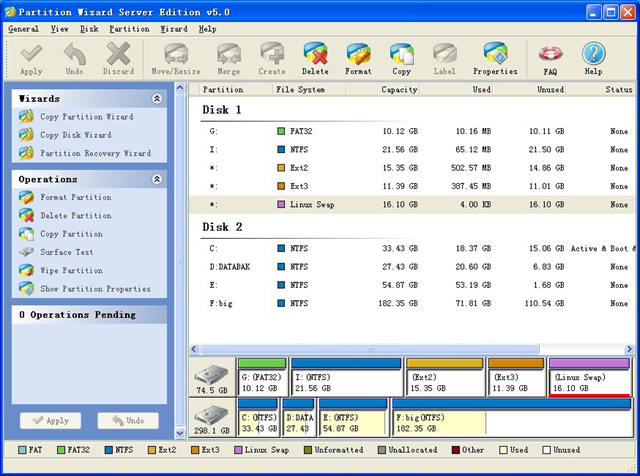
    1. Partition Wizard Home Edition
    Partition Wizard Home EditionMove, resize, copy, explore, and recover hard disk drive partitions.

    Latest Version: 5.0
    Operating system: Windows 2000/XP/Vista/7
    Web site: http://www.eofsoft.com

    Working as partition magic, Partition Wizard Home Edition is a free partition manager designed by MT Solution Ltd. This partition software supports 32/64 bit Windows Operating System. Home users can perform complicated partition operations by using this powerful but free partition manager to manage their hard disk partition such as Resizing partitions, Copying partitions, Create partition, Delete partition, Format partition, Convert partition, Explore partition, Hide partition, Change drive letter, Set active partition, Convert Dynamic Disk to Basic Disk, Surface Test, Change Partition Serial Number, Change Partition Type ID and Partition Recovery.

    What’s new in 5.0 version?
    Version 5.0 features: extend NTFS partition without reboot, Support Linux Ext2, Ext3 system, new GUI.

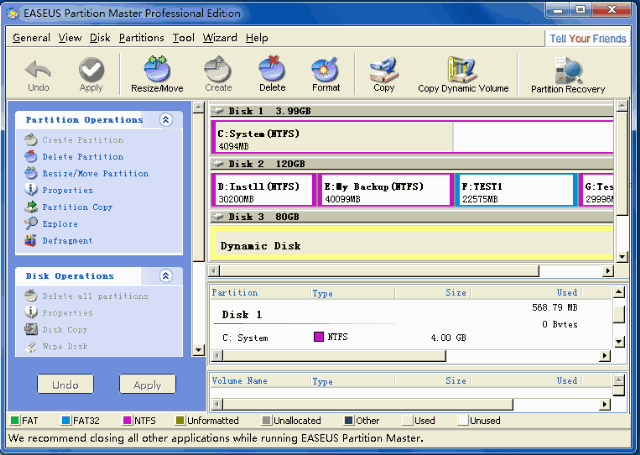
    2. Easeus Partition Master Home Edition
    Easeus Partition Master Home Edition Configure and manage partitions of hard drive.

    Latest Version: 5.8.1
    Operating system: Windows 2000/XP/Vista/7
    Web site: http://www.easeus.com

    Free Partition Manager–EASEUS Partition Master Home Edition is a partition magic alternative and partition management freeware. With its help, you can resize/move, copy, create, delete, format, hide, explore hard disk drive partitions. To extend system partition, have better disk space management, settle low disk space problem! The most attractive feature is it can resize/move partition without destroying data. This free partition manager is an ALL-IN-ONE partition solution and disk management utility. It allows you to extend partition (especially for system drive), manage disk space easily, settle low disk space problem under Windows 2000/XP/Vista/Windows 7 (Only for 32 bit). The most popular hard disk management functions are brought together with powerful data protection including: Partition Manager, Partition Recovery Wizard and Disk & Partition Copy Wizard. The Home Edition can recover files with sizes of up to 1 GB.

    What’s new in 5.8.1 version?
    Version 5.8.1 adds Convert dynamic disk to basic disk with all data protected.

    Read More

    Hard Drive Compatible

    I’m reinstating a very old computer I once used back in the days as use for a spare computer and I’m in need of a new hard drive.

    I was wondering if all SATA hard drives are compatible with my computer since I consider myself barely computer savvy.

    MB: GIGABYTE GA-M61PME-S2P AM2+/AM2 NVIDIA GeForce 6100 Micro ATX AMD Motherboard

    PSU: APEVIA WIN-500XSPX 500W ATX12V / EPS12V Power Supply

    I’m also wondering if my Nvidia Geforce GT 220 would work on this too since I just upgrade to another GPU on my main computer.

    I don’t need those 250+ GB hard drives, just wondering if I can just go around and buy a cheap one just to make this computer functional.

    I also have the OS CD available,both xp,visa and 7.(not pirated,they’re legal versions)

    If I get a answer soon, I’m looking to buy this:

    NIB HP 80GB SATA HDD Seagate Barracuda 7200 rpm
    Brand new in factory wrap HP Seagate Barracuda 80GB SATA HDD. These drives are compatible with many HP servers including the Proliant ML110. This item is guaranteed not DOA and has never been installed in a server. These were spare drives and would be perfect for increasing the storage capacity in your HP server.

    Any advice, or recommendations are welcomed. Have a nice day.

    Your motherboard has SATA 3GB and PCIe X16 slot so any SATA HDD should work and your GT220 should work just as well. Your PSU although not the best will drive this fine.

    Read More