Solve Disk Imaging Problems (Part 1)

Imaging tools provide custom hardware and software solutions to the challenges of read instability.

Processing All Bytes in Sectors with Errors

While the system software works well with hard disk drives that are performing correctly, read instability must be dealt with using specialized software that bypasses the BIOS and operating system. This specialized software must be able to use ATA read commands that ignore ECC status. (These commands are only present in the ATA specification for LBA28 mode, though, and are not supported in LBA48.) Also, the software should have the capability of reading the drive error register (Figure 2), which the standard system software doesn’t provide access to. Reading the error register allows specialized software to employ different algorithms for different errors. For instance, in the case of the UNC error (“Uncorrectable Data: ECC error in data field, which could not be corrected”), the software can issue a read command that ignores ECC status. In many cases, the AMNF error can be dealt with in a similar way.

disk imaging

Bit 0 – Data Address Mark Not Found: During the read sector command, a data address mark was not found after finding the correct ID field for the requested sector (usually a media error or read instability).

Bit 1 – Track 0 Not Found: Track 0 was not found during drive recalibration.
Bit 2 – Aborted Command: The requested command was aborted due to a device status error.
Bit 3 – Not used (0).
Bit 4 – ID Not Found: The required cylinder, head, and sector could not be found, or an ECC error occurred in the ID field.
Bit 5 – Not used (0).
Bit 6 – Uncorrectable Data: An ECC error in the data field could not be corrected media error or read instability).
Bit 7 – Bad Mark Block: A bad sector mark was found in the ID field of the sector or an Interface CRC error occurred.

Figure 2: ATA Error Register

Only when the sector header has been corrupted (an IDNF error) is it unlikely that the sector can be read, since the drive in this case is unable to find the sector. Experience shows, however, that over 90 percent of all problems with sectors are due to errors in the data, not in the header, because the data constitutes the largest portion of the sector.

Also, the data area is constantly being rewritten, which increases read instability. Header contents usually stay constant throughout the life of the drive. As a result, over 90 percent of   sectors that are unreadable by ordinary means are in fact still readable. Moreover, problem sectors usually have a small number of bytes with errors, and these errors can often be corrected by a combination of multiple reads and statistical methods.

If a sector is read ten times and a particular byte returns the same value eight times out of ten, then that value is statistically likely to be the correct one. More sophisticated statistical techniques can also be useful.

In fact, some data recovery solution providers have encountered situations in which every sector of a damaged drive had a problem. This situation would normally leave the data totally unrecoverable, but with proper disk imaging, these drives were read and corrected in their entirety.

Unfortunately, most imaging tools currently available on the market use system software to access the drive and are therefore extremely limited in their imaging capabilities. These products attempt to read a sector several times in the hope that one read attempt will complete without an ECC error. But this approach is not very successful. For example, if there is even a one percent chance of any byte being read incorrectly, the chances of reading all 512 bytes correctly on one particular read is low (about 0.58 percent). In this case, an average of 170 read attempts would be necessary to yield one successful sector read. As read instability increases, the chances of a successful read quickly become very low. For example, if there were a ten percent chance of reading any byte wrong, an average of 2.7 x 10²³ read attempts would be needed for one successful one. If one read attempt took 1 ms, this number of reads would take 8000 billion years, or many times the age of the universe. No practical number of read attempts will give a realistic chance of success.

However, if imaging software can read while ignoring ECC status, a 10 percent probability of a byte being read in error is not an issue. In 10 reads, very few bytes will return less than seven or eight consistent values, making it virtually certain that this value is the correct one. Thus, imaging software that bypasses the system software can deal with read instability much more easily.


Read More

Harddisk Diagnostic & Harddrive repair tool: PC 3000 System

PC 3000 HDD Repair Tool1. What is “PC 3000 System”?
PC-3000 Drive Restoration System is a Phase I tool, dealing with drive restoration and its two critical steps: harddisk diagnostic and harddrive repair.

2. Why you need “PC 3000 System”?
As a data recovery professional, chances are you have ways to deal with mechanical drive failures. You may even have some success with electronic problems using jury-rigged tools and trial and error. But can you handle the firmware problems that cause 50 percent of all drive failures-up to 90 percent for some models?

3. What is the highlights of  “PC 3000 System”?
* Designed specifically for the needs of data recovery businesses, PC-3000 does not require clean rooms, servo writers, or other expensive equipment.

* Universal utilities give you faster drive diagnostics, and let you decide on possible methods for recovery. Specialized utilities allow deeper diagnostics and firmware recovery in a drive’s vendor-specific mode.

* Unlike software repair utilities distributed by software development companies and drive manufacturers, PC-3000 repairs the drive and treats user data with respect. And unlike manufacturer’s test and repair software, PC-3000 comes with manuals and provides methods for drive restoration in a user data intact environment.

* Software that comes with PC-3000 features a user-friendly Microsoft Windows XP/2000 interface.

* PC-3000 comes with a range of adapters for the most common drive types, and firmware libraries are continually updated for new drives and patches, and you can download them as needed from DeepSpar.

* PC-3000 has built-in features to treat particular drives for their most common failures: for example, firmware damage in G-list and P-list corruption in Maxtor; SMART counters overflow in Western Digital, Fujitsu MPG issues and more.

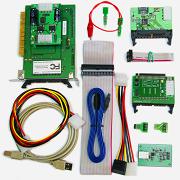
* The PC-3000 kit includes a PC-3000 PCI card, PC-3000 software, a range of adapters, and gives you access to downloads, user forum, and technical support.

4. Useful Links

  • Data sheet on the PC 3000 System
  • PC 3000 System Demo Video
  • Download a list of drives supported by PC-3000 UDMA, and PC-3000 for SCSI.
  • Comparison table: PC 3000 VS HD Doctor Suite
  • Contact to find out more about PC 3000 System (Such as Price, how to purchase…)

NEW: PC-3000 UDMA is now available. This latest version supports working in UDMA modes for vastly increased speed. (PC-3000 UDMA also combines the capabilities of both PC-3000 PCI and PC-3000 ISA.)

Read More

Data Recovery Glossary (Letter I)

IDE (Integrated Drive Electronics)
A type of drive where the interface controller electronics are incorporated into the design of the hard drive rather than as a separate controller.

Index Pulse Signal
A digital pulse signal indicating the beginning of a disk revolution. An embedded servo pattern or other prerecorded information is present on the disk following index.

Initiator
A device in control of the SCSI bus that sends commands to a target. Most SCSI devices have a fixed role as an initiator or a target; however, some devices can assume both roles.

Initialization
See low-level formatting.

Input
The incoming data that the computer processes, such as commands issued by the user.

Input/output (I/O)
An operation or device that allows input and output.

Interface
A hardware or software protocol that handles the exchange of data between the device and the computer; the most common ones are AT (also known as IDE) and SCSI. (See AT and SCSI.)

Interface controller
The chip or circuit that translates computer data and commands into a form suitable for use by the hard drive and controls the transfer of data between the buffer and the host. (See disk controller and disk drive controller.)

Interleave
The arrangement of sectors on a track.

Interrupt
A signal sent by a subsystem to the CPU that signifies a process has either completed or could not be completed.

ISA
Industry Standard Architecture. The standard 16-bit AT bus designed by IBM for the PC/AT system. ISA was the only industry standard bus for PCs until the recent release of MCA (MicroChannel Architecture), EISA (Extended Industry Standard Architecture), and PCI (Peripheral Component Interconnect).

Read More

RAID Data Recovery Is Possible!

RAID Data RecoveryWhat if your hard drive decides to enter the Elysian Fields in this very moment? Sure, you could simply get a new hard drive to substitute for the defective one with a quick run to your favorite hardware store. And with last night’s backup you might even reconstruct your installation quickly. But what if you don’t have a backup? The truth to be more like this: many users don’t even have a backup, or it simply is too old and thus useless for recovering any useful files at all. In case of real hard drive damage, only a professional data recovery specialist can help you – say bye-bye to your vacation savings!

Hard drive failure is especially disastrous for smaller companies working with a single server and a single disk, if they do not have a complete and working data backup at hand. The whole situation is even more complicated if the broken hard drive is a member of a RAID array. Neither hard drive failure in RAID 1 nor RAID 5 will result in data loss, since this scenario has been taken care of by the choice of these RAID levels in advance. But the risk of human error increases: self-made data loss occurs if you accidentally substitute the wrong drive in a degraded RAID 5 array (one with a failed hard drive).

But not all hard drives that show failure symptoms are defective. Sometimes, so called “soft errors” can be fixed using data recovery software. But even in this case, you should weigh the risks to see if it makes sense to take care of the problem yourself or get help from professionals. You might not be able to detect a controller failure right away, for example; usually, users assume a problem with the hard drive. Here is our rule of thumb: if you hear clacking sounds in the potentially defective hard drive, or if the computer’s S.M.A.R.T. function indicates an error during the boot process, something is wrong for sure.

What can you do once you know that an important hard drive is definitely broken? Or what happens if you pulled the wrong drive out of the slot while you were desperately trying to save your data? First of all: don’t panic! You need to act systematically and thoughtfully to be successful, as well as to ensure that you spend as little as possible on recovery – costs can hits four digits easily.

Read More