

To RAID-0 or Not To RAID-0

I was thinking about going down the RAID road with my rig and was wondering what people think is best RAID-0 or RAID 0+1(This is what i was thinking) or is there a better option advice would be well recived befor i go spend £150 on 3 more new drives to make the 4 needed for 0+1 and could you tell me how RAID 0+1 and RAID 1+0/10 differ please.

As was said up, it’s necessary to know the application before accurate advice can be given. RAID 0 will benefit you in database access, huge spreadsheets, video editing, CAD rendering and a few other specialized apps. For everybody else, all its going to do for you is getting you bragging rights for good benchmark scores.
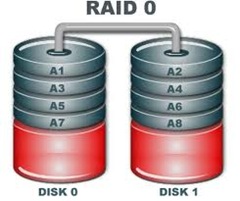
RAID 0

If you need data redundancy, and in reality who doesn’t, RAID 1 is a viable solution. For most data control situations an NAS presents a very convenient alternative and it easily performs the same job for multiple boxes. All data can be kept on the NAS with images of a standard “programs drive” as well as individual boot drives for each machine on the network, making cold metal restores a cinch. Many proprietary RAID formats will even allow ya to do rebuilds and expansions on the fly via “Hot Swap”. It’s also rather “portable” and the joke in my SOHO is that in case of fire, I can grab the NAS handle and run …. and after the data is safe come back in for the any employees, wife, kids, etc.

If your concern is only “one box”, RAID 1 provides data redundancy…..but so do other alternatives …. i.e. tape / optical, cloud backups …… RAID 0 , again unless you have specialized applications, will serve no observable benefit other than nice benchmark scores.

Read More

The Truth about Data Recovery

The Truth about Data RecoveryComputers can, without a doubt, be complicated beasts; one minute they are doing exactly what you want them to do, and the next they are suddenly going off and doing their own thing.  And before you know it, your computer crashes, leaving you with missing files, an increased heart rate and a bad temper.  But before you’re ready to throw your computer out the window in anger, let’s take a few deep breathes and talk about what actually happens when a file accidentally deleted and explore possible ways of getting that information back again.

For starters, when you unintentionally delete a file and begin to have a panic attack once the file has disappeared, you can rest assured that your file is not lost forever (phew!). The file will not be immediately visible in the directory or folder that you (or the computer) thought you stored it in. Instead, the file gets re-named so that the path it was using can be overwritten and can then be found in a hidden index file. The good news is, it can be completely recovered from this file if needed. In fact, all data continues to be stored on your computer until it is completely overwritten. And just to clear something up, by overwritten, I do not mean different information. It takes a random mix of binary code (0 and 1) to completely obliterate a data or file’s information. This is why hard drives should be absolutely and completely destroyed to an unrecognizable pulp or at least be overwritten by using a program that exists to overwrite data. Do not just recycle your computer or sell it to someone else without getting rid of your data properly first, or you could come to regret it later. This is especially important if you have sensitive information or media on the computer!

So now that we have established that data recovery is possible, how is it done? Well, there are a number of cleverly devised free and paid versions of data recovery programs available, depending on what your data recovering needs are. For example, you may have just accidentally deleted a file. Recovering this is relatively simple when compared to trying to recover data from a damaged or corrupted file. Not only can you retrieve the data but you can also use the software to recover other types of deleted information such as emails or email attachments.

Some paid data recovery programs have a “no recovery – no fee” guarantee.  This may seem like a pretty high guarantee to offer, but if self-recovery or the free programs aren’t giving you the results you need, the paid programs might be better route to take.  Furthermore, the free programs may have a smaller range of capabilities; how/why your data was lost in to begin with will likely determine how it can be recovered. No matter how you lost your data and how hopeless you think the situation may be in returning that data to your computer, fear not. There are data recovery experts available to help you no matter how severe your data loss may (seem to) be!

Read More

2060-701622-000 WD PCB Circuit Board

HDD Printed circuit board (PCB) with board number 2060-701622-000 is usually used on these Western Digital hard disk drives: WD1001FALS-00J7B1, DCM HANNNT2CB, Western Digital 1TB SATA 3.5 Hard Drive; WD1001FALS-00J7B1, DCM HBNNHV2CA, Western Digital 1TB SATA 3.5 Hard Drive; WD1001FALS-00J7B1, DCM HBNNHV2AB, Western Digital 1TB SATA 3.5 Hard Drive; WD1001FALS-00J7B1, DCM HARNHV2CB, Western Digital 1TB…

Read More

Glossary of Samsung Hard Disk Drive (Letter T, U, V, W)

Samsung Hard Drive Glossary TOC
Table of Contents

Track
a radial position of heads over the media (circular ring)

Track following servo (also closed loop)
Control system which reflects if the head is in the correct position over the track, if this isn’t the case, the actuator is instructed to adjust its position (in real time)

Transfer rate
the speed at which the drive sends and receives data from the controller

Thin-film head
an older type head technology, with a single head which reads and writes information (dual function)

TPI
Tracks Per Inch, reflects areal density

UDP (Universal Disk Product)
A file system that supports the current generation of CD’s such as CD-RW, DVD-ROM, DVD-Video

USB (Universal Serial Bus)
A common part on Personal Systems that allow compliant peripherals to be integrated into supporting systems

Voice Coil Motor
electro-magnetic positioning motor (actuator). A wire coil is placed in a stationary magnetic field. When current is passed through the coil the resultant flux causes the coil to move

Winchester Disks
early IBM hard disk model, still used as a reference to today’s HDD

WORM (Write Once Read Many)
description for media which can only be written on once

Read More