Articles

Western Digital PCB Buying Guide (IDE)

As we know:  Western Digital HDD can’t spin; board/chip be burnt; interface broken; etc. These problems are caused by PCB malfunction. Swap PCB of your Western Digital hard drives can resolve the problems.

1. Western Digital Hard Drives PCB Buying Guide (IDE):

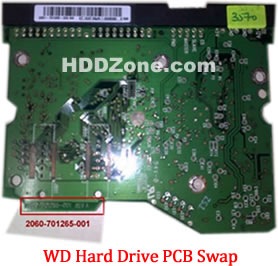
For Western Digital HDD pcb swap needs,  you just need the donor PCB has the same pcb board number(2060-701265-001) as yours.

western-digital-hard-drive-pcb-swap

One thing you should know before this purchasing: Most PCB’s BIOS chip(ROM Chip) store the unique information. We need change the BIOS form original PCB to replacement PCB, in order to make the replacement PCB compatible with the HDD.  The 8pins (4 pins on each sides) with 25P05VP、25P10VP、25F512、25F1024、25F1024AN、SST25VF512、SST25VF010, etc. are the BIOS Chip. LocalTV/Phone Repair Shop can offer these services for $5-%20.

2. Where to buy these Western Digital PCB circuit boards?

Western Digital PCB 2060-701596-001
Western Digital PCB 2060-001113-001
Western Digital PCB 2060-001092-007
Western Digital PCB 2060-001092-006
Western Digital PCB 2060-001127-003
Western Digital PCB 2060-001076-002
Western Digital PCB 2060-001062-004
Western Digital PCB 2060-001047-001
Western Digital PCB 2060-001100-003
Western Digital PCB 2060-701494-001
Western Digital PCB 2060-701552-002
Western Digital PCB 2060-001068-001
Western Digital PCB 2060-001092-006
Western Digital PCB 2060-001113-001
Western Digital PCB 2060-001129-001
Western Digital PCB 2060-001179-003
Western Digital PCB 2060-701265-001
Western Digital PCB 2060-701292-000
Western Digital PCB 2060-701292-001
Western Digital PCB 2060-701292-002
Western Digital PCB 2060-001130-012
Western Digital PCB 2060-701508-001
Western Digital PCB 2060-701494-002
Western Digital PCB 2060-001130-010
Western Digital PCB 2060-001128-005
Western Digital PCB 2060-001266-001
Western Digital PCB 2060-001266-000
Western Digital PCB 2060-001265-001
Western Digital PCB 2060-001189-003
Western Digital PCB 2060-001177-000
Western Digital PCB 2060-001175-000
Western Digital PCB 2060-001173-004
Western Digital PCB 2060-001159-006
Western Digital PCB 2060-001292-000

Note: Western Digital PCB sells on HDDZone.com are fully tested before shipment(worldwide free shipping now!); These are just PCB (Printed Circuit Boards), not the whole HDD (Hard Disk Drive).

More other pcb swap guide please refer to this post: hard Drive PCB Swap

Western Digital PCB Buying Guide (IDE) Read More »

Hard Drive Data Recovery

If you use a HDD with a decent amount of time, there is a good chance someone has told you that data stored on the HDD is not exactly safe. It is definitely true.

The fact that unlike tapes or CDs or other methods of storage, hard drives are mechanical, active devices and are thus subject to comparatively rapid breakdown.

The real threats to hard drives are the people who use them. Working as a computer tech during the glory days of Windows XP, you get rather used to using FDISK and other hard drive utilities to prepare and repair customer’s drives, which leads to certain over confidence.

Picture this if you will; there are two or three sentences and a screen shot away from finishing a 5000+ word article on computer upgrades. All we should do was fire up FDISK on a dual boot Windows PC system and grab a few screen shots. Write a little blurb on how to partition a drive, making sure to tell the readers not to mess with FDISK if they were not sure what they were doing…

Anyway, wanted to get some more screen shots of the actual partitioning screen, but you did not have a blank hard drive handy. You can use my NTFS formatted XP drive (which FDISK perceived as a blank drive) to start the “process,” grab the screen shots and then cancel the partitioning.

Except for one little thing
FDISK, in the process of checking the disk before it prompts you for the size of the partition, writes information to certain areas of the hard drive. This data writes over whatever might have been there before. Meanwhile, there I was, watching the ‘%complete’ counter and wondering why a little red warning flag kept going off in brain? Restarted WinXP and waited for it to boot, and waited… and waited…

The hard drive that suffered the data loss was a 1TB Hitachi drive with two 5Gb XP NTFS partitions (Home and Professional) and 6Gb of unused space. Both XP partition were unbootable after the incident.

After transferring the drive to a Windows 2000 computer, then use disk manager, (to load disk manager on XP or 2000, right click ‘my computer’ select ‘manage’ then ‘disk manager’) this is what I saw.

The Primary partition where my 5000+ word article was saved, is seen as unformatted and cannot be read by the OS. The second XP partition could not be booted, but was seen as formatted and I could transfer files easily from it using explorer.

Hard Drive Data Recovery Read More »

Maxtor DiamondMax Plus 9 PCB Circuit Boards

Maxtor DiamondMax Plus 9 PCB Circuit Boards Swap/Replacement for Data Recovery Needs.
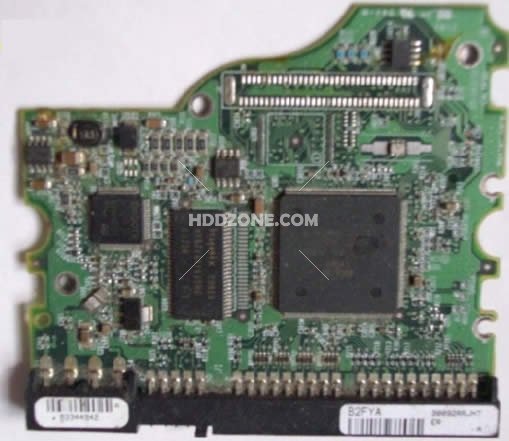
Maxtor DiamondMax Plus 9 PCB Hello! Do you have a PCB in stock that will work with my specifications?
MAXTOR DIAMONDMAX 9 120GB
Code: YAR41BW0
Model: 6Y120P0-131211
Chip: Ardent C5-C1 040111500
An 8-pin chip is PRESENT at the opposite end of board from the connectors.

I believe this is the PCB board is the one that I need but I can’t locate
“motor combo #”.  Maxtor 040111300 DiamondMax Plus 9 PCB
Maxtor ARDENT C8-C1 040111300 DiamondMax Plus 9 PCB
Main Controller IC: ARDENT C8-C1 040111300
HDD Motor Combo IC: L7250E 1.2

I have a Maxtor 0401115000 DiamondMax Plus 9, my question is that you have has a HDD Motor Combo IC: L7250E 1.2, On my drive it
is L7250E 1.0, Are they compatible, and will they interchange? I do know
that this would be my gamble but I would like to know as much as possible
before putting out the money. Thank you, Clyde.

Im trying to get a replacement board for my Maxtor DiamondMax Plus 9 – 80 Gb
The closest I can find is;
Maxtor Ardent C5-C1 040111500 DiamondMax Plus 9 PCB
Main Controller IC: Ardent C5-C1 040111500
HDD Motor Combo IC: L7250E 1.2
Everything else matches but the HDD Motor Combo IC on mine is;
HDD Motor Combo IC: L7250E 1.0
Will this make a difference or will I still be able to use the board
available from you to retrieve the data on this disk?
Many thanks

Order Maxtor DiamondMax Plus 9 PCB on HDDZone.com with worldwide free shipping.
Maxtor DiamondMax Plus 9 PCB Circuit Boards Read More »

Hard Drive PCB Swap

HDD can’t spin; board/chip be burnt; interface broken; etc. These problems are caused by PCB malfunction. Swap PCB can resolve the problems.

The probability of HDD’s other problems are unlikely caused by PCB’s fault. Such as: HDD can spin, but can’t be recognized; HDD can be recognized correctly but will report a size of 0 bytes; HDD report SMART errors on boot, etc.

If your HDD’s problem is caused by PCB malfunction, you need swap PCB.

1. How to find a matching PCB

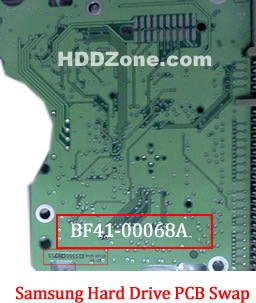
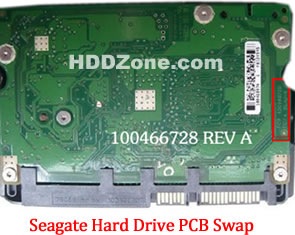
For Seagate HDD/Western Digital HDD/Samsung HDD, just need the donor PCB has the same board number as yours.

seagate-hard-drive-pcb-swap

* Seagate Hard Drive PCB Swap

western-digital-hard-drive-pcb-swap

* Western Digital Hard Drive PCB Swap

samsung-hard-drive-pcb-swap

* Samsung Hard Drive PCB Swap

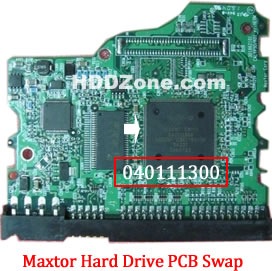
For Maxtor PCB, just need the donor PCB has the same Main Controller IC as yours.

maxtor-hard-drive-pcb-swap

* Maxtor Hard Drive PCB Swap

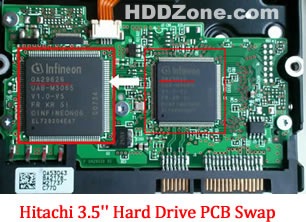
For Hitachi PCB If the PCB is Hitachi PCB, 3.5″ PCB, please send your PCB’s photo (the side with chips) to us. We need to check it shape. Also please advise the number on the Main Controller IC, as below photo:

hitachi-3.5-inch-hard-drive-pcb-swap

* Hitachi 3.5′” Hard Drive PCB Swap

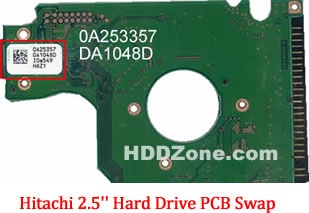
Hitachi 2.5″ PCB, Please offer the first two lines numbers on the white label, as the below photo:

hitachi-2.5-inch-hard-drive-pcb-swap

* Hitachi 2.5′” Hard Drive PCB Swap

2. Before PCB Swap you should know:

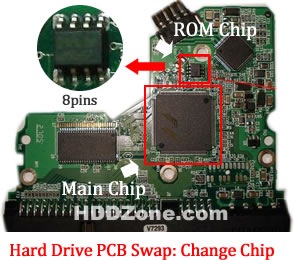
1. Most PCB’s BIOS chip(ROM Chip) store the unique information. We need change the BIOS form original PCB to replacement PCB, in order to make the replacement PCB compatible with the HDD.  The 8pins (4 pins on each sides) with 25P05VP、25P10VP、25F512、25F1024、25F1024AN、SST25VF512、SST25VF010, etc. are the BIOS Chip.

Tips: Most of the TV/Phone Repair Shop can offer these services for just $5-%20

hard-drive-pcb-swap-change-chip

* Hard Drive PCB Swap: Change BIOS Chip, Main Chip

2. Some PCB don’t have separate BIOS. The BIOS be integrated on the Main Controller IC(The biggest chip on the board, also named Main Chip). We should exchange the Main Controller IC to let the HDD be recognized.

3. How to change PCB’s BIOS/Main Chip:

hard-drive-pcb-rom-main-chip-swap-tool

* Hard Drive PCB ROM/Main Chip Swap Tool

change-hard-drive-rom-bios-chip

* Remove the ROM chip from the original pcb

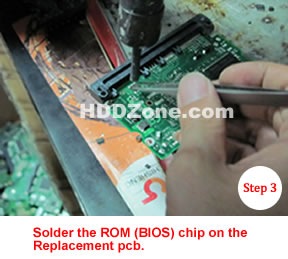
hard-drive-rom-bios-chip-removed

hard-drive-rom-bios-chip-swap

* Solder the ROM chip to the replacement pcb

Note: Chang Main Controller IC is similar as change BIOS. Need you have more patience and do it more carefully. If you think these operations are too difficult, you can find your local AV/TV repair shop help you.

5. Hard Drive PCB Supplier:

HDDZone.com (Seagate, Western Digital, Samsung, Maxtor PCB Boards with free shipping)

Hard Drive PCB Swap Read More »

Kroll Ontrack launches Ontrack Data Recovery Portal

krollontrack_logo Data recovery vendor, Kroll Ontrack, recently launched its free Ontrack data recovery portal, which offers a paperless service for partners.


“We were developing it for the US market but the shortage of education on this matter led us to roll it out here in Australia. It gives the ability for the partner to log jobs through the online portal and they can open up a job, send in a device for recovery, and watch its progress,” Kroll Ontrack Asia-Pacific general manager, Adrian Briscoe said.

Briscoe mentioned that introducing the portal has made its partners more self-serving, eliminating the need to call in and speak to its consultant. Onsite computer service provider and Kroll Ontrack Australian partner, Geeks2U managing director, David Hancock, said that the portal has enabled its business to manage its customers’ data recovery needs independently.

This portal is an added service to its data recovery certified partner program, launched in May 2011, that offers partners with training and informational materials and access to its data recovery methodology.

Through the certified partner program, the company has already registered more than 245 certified partners across A/NZ, and intends to grow that base to 270 partners, Briscoe claimed.

In further educating the market, Kroll Ontrack launched a data recovery awareness campaign to dispel data recovery myths.

He said that the campaign aims to help consumers and organisations with selecting a data recovery service that is right for their needs and helps protect their data from future loss.

“Data recovery myths can be disproved with the right technology, technical know-how and approach to service,” Briscoe said.

The top five data recovery myths include:

  • The most inexpensive data recovery quote will result in the same outcome as the other quotes
  • Not experiencing a significant data loss means a business does not require a data recovery plan
  • In the event of a data loss situation, a company’s IT department can handle it
  • Data recovery is not possible in some situations and for some technologies
  • Due to the nature of their business, all data recovery companies know how to keep a company’s data safe

More information on these myths can be accessed from www.krollontrack.com/data-recovery/myths/

Kroll Ontrack launches Ontrack Data Recovery Portal Read More »

PCB Board for Seagate Barracuda 7200

1. I’m looking for a PCB replacement for my Seagate 7200.12 ST3500418AS with firmware version CC35.

The specification for my board is:
Board number: 100535704 Rev A
Main Controller IC: B5502C0
HDD Motor Combo IC: SH6964BD

2. I need a PCB for Seagate ST3250820A P/N: 9BJ03E-305
Firmware: 3.AAE
Site code: TK
HDD:Barracuda 7200.10 250 250GB
Main Controller IC: 100427288
Could you please tell if you have one that works in this HDD.
Thank you in advanced!

PCB Boards for Seagate Barracuda 7200 on HDDZone.com

  • Seagate Barracuda 7200.12 PCB
  • Seagate Barracuda 7200.11 PCB
  • Seagate Barracuda 7200.10 PCB
  • Seagate Barracuda 7200.9 PCB
  • Seagate Barracuda 7200.8 PCB
  • Seagate Barracuda 7200.7 PCB

Replacement the PCB will not solve the problem below:

The drive will power up normally (no ticking noises, errors etc) but will not be recognized by the computer;

The drive will power up normally and be recognized correctly but will report a size of 0 bytes;

The drive will power up but report SMART errors on boot;

PCB Board for Seagate Barracuda 7200 Read More »

Data Loss, A Growing Concern For Small Business

data-lossThe growing trend toward bring your own device(BYOD) in the workplace is putting company data at risk, according to a survey by Mozy and Compass Partners. Most (87 percent) small and midsize businesses have no formal policy in place regarding employees’ use of personal devices for work purposes — and 80 percent weren’t even concerned. About 33 percent of companies let employees make their own decisions about how to back up company and client data on their devices, and most companies lack adequate backup or data recovery plans for those devices.

Besides not backing up, employees are engaging in other risky behavior with their personal devices, including not having antivirus protection, leaving laptops alone in coffee shops or other public places, using public computers to access company networks and transferring unencrypted data.

Why it matters to your business: The risk of loss isn’t just theoretical. For example, 11 percent of the survey’s respondents said employee laptops have been stolen in the past, and in 98 percent of those cases, all of the lost data was never recovered. The “bring your own device” trend isn’t going away, but if you allow it, you do need to set some rules to protect your customers’ data, your data — and your business.

About Mozy
Mozy is the world’s most trusted online backup service for consumers and businesses, with more than three million customers, 70,000 business users and 70 petabytes of information stored at its multiple data centers around the globe. Mozy was acquired by EMC Corporation in 2007 and operates as part of Decho Corporation, an EMC company. More information can be found at www.mozy.com

About the Study
The study was executed by Compass Partners LLC, an independent market research firm focused on consumer technology. The study was fielded among 641 business decision makers responsible for the purchase of software and computer related services for small and medium businesses with 1 – 1,000 full-time employees. Field dates were October 24 through November 1, 2011. For each industry vertical sampled (each cell contained a minimum of 100 responses), the margin of error is +/- 9.8% at 95% confidence interval.

Data Loss, A Growing Concern For Small Business Read More »

5 Ways to Reduce Hosting Costs

5 Ways to Reduce Hosting CostsWithout a web host, it’s going to be impossible to show your website to the rest of the world. Since there’s no way around a hosting bill, you’re going to have to fork over cash month by month. Thankfully, there are some things that you can do to save on your monthly hosting bill. To make sure that you’re not throwing any of your hard-earned money away, here are five saving tips to consider:

Shared Hosting

Shared hosting is a pinch different from a virtual private server, also known as a VPS. A VPS is a server that is your own, where a shared host is shared by hundreds of other customers. If your website is now hosted on a VPS and it doesn’t receive a lot of traffic, consider making the jump to a shared package to save at least 50 percent.

Shop Around

Web hosting pricing packages change. If you haven’t compared prices in at least six months, you may want to shop around. What you may find is that some companies may offer promotional deals or a price that is hard to beat. When choosing a new web host though, just be sure to research the host ahead of time. Know the server up time, customer service and features it offers.

Reduce the Features

Do you have a web host that allows you to store 100 gigabytes? If you’re running a small five-page website that takes up no space, why bother having that much space? Talk with your host to see if they can lower your space and bandwidth. Similar to a cell phone package, the less you need, the less you’ll pay.

Multiple Domains

Do you own more than one domain? If so, hopefully they are hosted all on the same server and not spread across multiple hosting plans. Many hosting companies such as Brain Host allow you to host unlimited domains on one server. This way, you only pay one hosting bill for all your domains. It’s kind of silly to have a hosting account for each domain that you own.

Free Features

How many features does your current web host have? Do they offer free website builders? Do they have free email clients? Many hosting companies today charge extra for additional email accounts, scripts, shopping cart software and other related features. Try your best to get as many free features as possible.

With thousands of web hosts out there, it’s not that hard to find one that can save you a lot of money. By implementing a few of the tips mentioned above, your hosting bill can drop as early as next month.

5 Ways to Reduce Hosting Costs Read More »

Wanted:Western Digital Harddrive PCB

Questions from readers:

1. Is this board the same since the actual number is 2060-701477-800 ? Would the last three digits make any difference?

I have been a computer tech since 1959 and have changed many chips but none of this caliber. I know there is special methods for removal and replacement and I don’t have that type of equipment.

2. Hi.  I’m in need of a WD hd PCB, board # 2060-701335-003 REV A.  I see you
have the board, but no revision listed, A or B.  Will this PCB work?  Thank you

3. I need a 2061-701622-800 02P PCB for a WD1001FALS hard drive. As I see you don’t have such in stock now. Is there any possibility that you will ever have it in stock? Or can you order it from your supplier or something like that?

4. I’m looking for the circuit board for a Western Digital external. The info is as follows: WD3200B MVV – 11A 1PSO Drive parameters: LBA 625142448. The number is 2060-701650-000-REV P1

5. I`m looking for a PCB for my Western Digital Harddrive:
*  WD5000AAJS
*  WD Cavier SE
*  MDL: WD5000AAJS-00YFA
*   Date:11OCT2007
*   DCM:DANNNT2AAB
*   LBA 976773168
*   WWN:50014EE2AB483375
*   S/N: WCAS81632508
*   Label: 2061-701477-100AC  XC4U090BYWE0003130 8133
*   On board: 2060-701477-002 REV A
Whow much would it cost with shipping to Germany?

Answer:

Buy Western Digital IDE PCB, Western Digital SATA PCB on HDDZone.com with low price, fast shipping and top-rated customer service! All kinds of Western Digital PCB for your Data Recovery Needs!

Wanted:Western Digital Harddrive PCB Read More »

First Steps in Computer Forensics: Securing Your Network

First Steps in Computer Forensics: Securing Your NetworkNo matter how secure your infrastructure is, sooner or later you will become a victim of a computer crime. Someone may point a DDoS (Distributed Denial of Service) attack at your services, may sniff your network, or may copy/delete confidential information. You may not even realize such a thing has happened. However, in an organized and secured network, you will be notified at the first signs of an attack. Now what? Your first normal reaction would be to stop the attack with whatever means possible. However, that may not be the best response. If you don’t possess the needed knowledge yourself, it might be a good idea to leave the crime scene as it is and let a computer forensics investigator deal with it. Let’s focus on the steps that the investigator would take. You may choose to take these steps alone but you will most likely not have all the necessary support tools and systems for that.

  1. Document the system – name, date, time, purpose, hardware, software, it all matters.
  2. Collect evidence – all the information about the attack should be securely taken off the target system. This is usually done through specific software that hashes all the information. This way, the information is legitimate and can be used as formal evidence for prosecution. The evidence that is usually collected includes active network connections, processes loaded into memory, and a copy of all the information on the disk with the respective creation, modification, and access values. The collector should be confident about the security of the system used for storage and analysis of the copied evidence. Only after this step, is it beneficial to unplug or shut down the affected system. If the affected system is saving logs on a remote server, copy them as well, although they are less likely to be compromised by the attack. In Linux, programs could still be running even after their files have been deleted. You can search for such programs with the command: file /proc/[0-9]*/exe|grep “(deleted)” . If you want to make a copy of this list use: /bin/dd if=/proc/filename/exe of=filename .
  3. Recreate the timeline of the attack – once all the information is copied on a secured workstation, the timeline of the attack can be recreated from the times of creation, modification, and access of all the files. This should be done before anything else, because the other steps can change the original times of the files. The timeline will show the last executed file, the last created/deleted folder, executed scripts, etc.
  4. Deeper analysis of the affected system – using the information collected in the previous steps, a deeper analysis can be performed of the system in order to find suspicious installations, creation or deletion of folders, and the like. Forensics investigators have specific tools for this step.
  5. File information restoration – the slack or unallocated space can be investigated for parts of files that, when combined, may indicate the time of deletion of files. It can be useful for the recreation of the steps of the attacker.
  6. Search – use all the information gathered so far to search for specific names, IP addresses, and file names, that can point you to the intruder.
  7. Report – no matter if the compromised system is your company’s or another’s, it is always good to document all your findings during the investigation. If it’s done right it can even be used in court.

Don’t make the mistake of not taking computer crimes seriously! In today’s digital world, computer crimes are just as serious as any other ones. Don’t hesitate to call a specialist if you’re not sure you can handle the investigation process alone. If your organization is big enough and your budget allows it, think about creating a Computer Security Incident Response Team which will be prepared for computer crimes and will have procedures and resources in place to handle them properly.

http://blog.monitis.com/index.php/2012/05/17/first-steps-in-computer-forensics/

Syndicated stories and blog feeds, all rights reserved by the author.

First Steps in Computer Forensics: Securing Your Network Read More »

Scroll to Top