
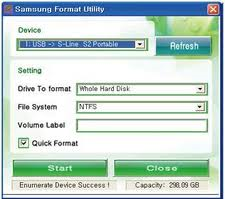
What is Samsung Format Utility?
The Samsung Format utility is a program specifically designed for formating Samsung External Hard Disk drives. It can be used to format the hard drive using either the FATS32 or NTFS file system.
How to use Samsung Format Utility?
- 1. Download the Samsung Format Utility program to you main system drive.
- 2. Run the executable to extract the utility to a location on your main system drive (not the external drive).
- 3. Ensure the Samsung External Disk Drive is attached to your system. Double click on the executable file, and follow the prompts.
You can refer to the Samsung Format Utility Manual for full instructions
- Samsung_Format_Utility_V1.4
- Samsung_Format_Utility_Manual
Caution
The Samsung Format Utility will erase all data on the external disk drive. Ensure you have backup copies of all data from the External Disk Drive before running this utility.