PCB Board for Seagate Barracuda 7200

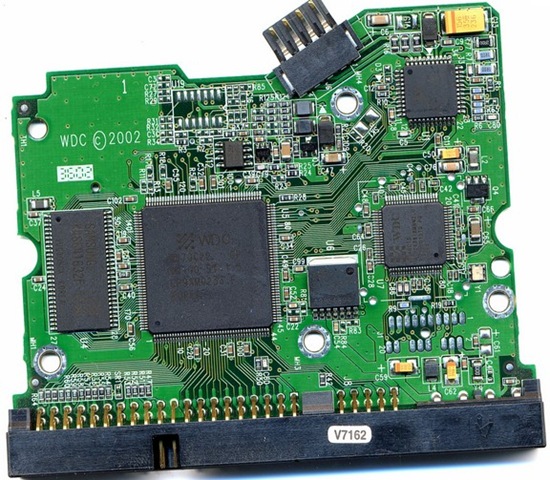
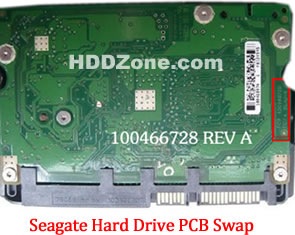
1. I’m looking for a PCB replacement for my Seagate 7200.12 ST3500418AS with firmware version CC35.

The specification for my board is:
Board number: 100535704 Rev A
Main Controller IC: B5502C0
HDD Motor Combo IC: SH6964BD

2. I need a PCB for Seagate ST3250820A P/N: 9BJ03E-305
Firmware: 3.AAE
Site code: TK
HDD:Barracuda 7200.10 250 250GB
Main Controller IC: 100427288
Could you please tell if you have one that works in this HDD.
Thank you in advanced!

PCB Boards for Seagate Barracuda 7200 on HDDZone.com

  • Seagate Barracuda 7200.12 PCB
  • Seagate Barracuda 7200.11 PCB
  • Seagate Barracuda 7200.10 PCB
  • Seagate Barracuda 7200.9 PCB
  • Seagate Barracuda 7200.8 PCB
  • Seagate Barracuda 7200.7 PCB

Replacement the PCB will not solve the problem below:

The drive will power up normally (no ticking noises, errors etc) but will not be recognized by the computer;

The drive will power up normally and be recognized correctly but will report a size of 0 bytes;

The drive will power up but report SMART errors on boot;

Read More

Data Loss, A Growing Concern For Small Business

data-lossThe growing trend toward bring your own device(BYOD) in the workplace is putting company data at risk, according to a survey by Mozy and Compass Partners. Most (87 percent) small and midsize businesses have no formal policy in place regarding employees’ use of personal devices for work purposes — and 80 percent weren’t even concerned. About 33 percent of companies let employees make their own decisions about how to back up company and client data on their devices, and most companies lack adequate backup or data recovery plans for those devices.

Besides not backing up, employees are engaging in other risky behavior with their personal devices, including not having antivirus protection, leaving laptops alone in coffee shops or other public places, using public computers to access company networks and transferring unencrypted data.

Why it matters to your business: The risk of loss isn’t just theoretical. For example, 11 percent of the survey’s respondents said employee laptops have been stolen in the past, and in 98 percent of those cases, all of the lost data was never recovered. The “bring your own device” trend isn’t going away, but if you allow it, you do need to set some rules to protect your customers’ data, your data — and your business.

About Mozy
Mozy is the world’s most trusted online backup service for consumers and businesses, with more than three million customers, 70,000 business users and 70 petabytes of information stored at its multiple data centers around the globe. Mozy was acquired by EMC Corporation in 2007 and operates as part of Decho Corporation, an EMC company. More information can be found at www.mozy.com

About the Study
The study was executed by Compass Partners LLC, an independent market research firm focused on consumer technology. The study was fielded among 641 business decision makers responsible for the purchase of software and computer related services for small and medium businesses with 1 – 1,000 full-time employees. Field dates were October 24 through November 1, 2011. For each industry vertical sampled (each cell contained a minimum of 100 responses), the margin of error is +/- 9.8% at 95% confidence interval.

Read More

5 Ways to Reduce Hosting Costs

5 Ways to Reduce Hosting CostsWithout a web host, it’s going to be impossible to show your website to the rest of the world. Since there’s no way around a hosting bill, you’re going to have to fork over cash month by month. Thankfully, there are some things that you can do to save on your monthly hosting bill. To make sure that you’re not throwing any of your hard-earned money away, here are five saving tips to consider:

Shared Hosting

Shared hosting is a pinch different from a virtual private server, also known as a VPS. A VPS is a server that is your own, where a shared host is shared by hundreds of other customers. If your website is now hosted on a VPS and it doesn’t receive a lot of traffic, consider making the jump to a shared package to save at least 50 percent.

Shop Around

Web hosting pricing packages change. If you haven’t compared prices in at least six months, you may want to shop around. What you may find is that some companies may offer promotional deals or a price that is hard to beat. When choosing a new web host though, just be sure to research the host ahead of time. Know the server up time, customer service and features it offers.

Reduce the Features

Do you have a web host that allows you to store 100 gigabytes? If you’re running a small five-page website that takes up no space, why bother having that much space? Talk with your host to see if they can lower your space and bandwidth. Similar to a cell phone package, the less you need, the less you’ll pay.

Multiple Domains

Do you own more than one domain? If so, hopefully they are hosted all on the same server and not spread across multiple hosting plans. Many hosting companies such as Brain Host allow you to host unlimited domains on one server. This way, you only pay one hosting bill for all your domains. It’s kind of silly to have a hosting account for each domain that you own.

Free Features

How many features does your current web host have? Do they offer free website builders? Do they have free email clients? Many hosting companies today charge extra for additional email accounts, scripts, shopping cart software and other related features. Try your best to get as many free features as possible.

With thousands of web hosts out there, it’s not that hard to find one that can save you a lot of money. By implementing a few of the tips mentioned above, your hosting bill can drop as early as next month.

Read More

Wanted:Western Digital Harddrive PCB

Questions from readers:

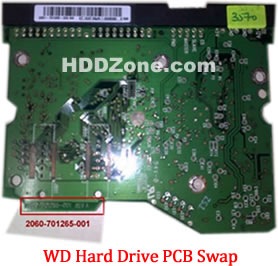
1. Is this board the same since the actual number is 2060-701477-800 ? Would the last three digits make any difference?

I have been a computer tech since 1959 and have changed many chips but none of this caliber. I know there is special methods for removal and replacement and I don’t have that type of equipment.

2. Hi.  I’m in need of a WD hd PCB, board # 2060-701335-003 REV A.  I see you
have the board, but no revision listed, A or B.  Will this PCB work?  Thank you

3. I need a 2061-701622-800 02P PCB for a WD1001FALS hard drive. As I see you don’t have such in stock now. Is there any possibility that you will ever have it in stock? Or can you order it from your supplier or something like that?

4. I’m looking for the circuit board for a Western Digital external. The info is as follows: WD3200B MVV – 11A 1PSO Drive parameters: LBA 625142448. The number is 2060-701650-000-REV P1

5. I`m looking for a PCB for my Western Digital Harddrive:
*  WD5000AAJS
*  WD Cavier SE
*  MDL: WD5000AAJS-00YFA
*   Date:11OCT2007
*   DCM:DANNNT2AAB
*   LBA 976773168
*   WWN:50014EE2AB483375
*   S/N: WCAS81632508
*   Label: 2061-701477-100AC  XC4U090BYWE0003130 8133
*   On board: 2060-701477-002 REV A
Whow much would it cost with shipping to Germany?

Answer:

Buy Western Digital IDE PCB, Western Digital SATA PCB on HDDZone.com with low price, fast shipping and top-rated customer service! All kinds of Western Digital PCB for your Data Recovery Needs!

Read More

First Steps in Computer Forensics: Securing Your Network

First Steps in Computer Forensics: Securing Your NetworkNo matter how secure your infrastructure is, sooner or later you will become a victim of a computer crime. Someone may point a DDoS (Distributed Denial of Service) attack at your services, may sniff your network, or may copy/delete confidential information. You may not even realize such a thing has happened. However, in an organized and secured network, you will be notified at the first signs of an attack. Now what? Your first normal reaction would be to stop the attack with whatever means possible. However, that may not be the best response. If you don’t possess the needed knowledge yourself, it might be a good idea to leave the crime scene as it is and let a computer forensics investigator deal with it. Let’s focus on the steps that the investigator would take. You may choose to take these steps alone but you will most likely not have all the necessary support tools and systems for that.

  1. Document the system – name, date, time, purpose, hardware, software, it all matters.
  2. Collect evidence – all the information about the attack should be securely taken off the target system. This is usually done through specific software that hashes all the information. This way, the information is legitimate and can be used as formal evidence for prosecution. The evidence that is usually collected includes active network connections, processes loaded into memory, and a copy of all the information on the disk with the respective creation, modification, and access values. The collector should be confident about the security of the system used for storage and analysis of the copied evidence. Only after this step, is it beneficial to unplug or shut down the affected system. If the affected system is saving logs on a remote server, copy them as well, although they are less likely to be compromised by the attack. In Linux, programs could still be running even after their files have been deleted. You can search for such programs with the command: file /proc/[0-9]*/exe|grep “(deleted)” . If you want to make a copy of this list use: /bin/dd if=/proc/filename/exe of=filename .
  3. Recreate the timeline of the attack – once all the information is copied on a secured workstation, the timeline of the attack can be recreated from the times of creation, modification, and access of all the files. This should be done before anything else, because the other steps can change the original times of the files. The timeline will show the last executed file, the last created/deleted folder, executed scripts, etc.
  4. Deeper analysis of the affected system – using the information collected in the previous steps, a deeper analysis can be performed of the system in order to find suspicious installations, creation or deletion of folders, and the like. Forensics investigators have specific tools for this step.
  5. File information restoration – the slack or unallocated space can be investigated for parts of files that, when combined, may indicate the time of deletion of files. It can be useful for the recreation of the steps of the attacker.
  6. Search – use all the information gathered so far to search for specific names, IP addresses, and file names, that can point you to the intruder.
  7. Report – no matter if the compromised system is your company’s or another’s, it is always good to document all your findings during the investigation. If it’s done right it can even be used in court.

Don’t make the mistake of not taking computer crimes seriously! In today’s digital world, computer crimes are just as serious as any other ones. Don’t hesitate to call a specialist if you’re not sure you can handle the investigation process alone. If your organization is big enough and your budget allows it, think about creating a Computer Security Incident Response Team which will be prepared for computer crimes and will have procedures and resources in place to handle them properly.

http://blog.monitis.com/index.php/2012/05/17/first-steps-in-computer-forensics/

Syndicated stories and blog feeds, all rights reserved by the author.

Read More

Stunning Features of Stellar Phoenix File Undelete Software

Have you recently deleted any important files or folders from hard drive but wants to get it back? Don’t get panic because there is a simple solution to all your file data loss problems which becomes life savior for your deleted files and can bring it back to life.

Whatever the data loss situations and type of deleted files, Stellar Phoenix provides a series of data recovery software to efficiently recover them all from almost any platform like Windows, MAC, Linux, Unix. Most of the software’s from stellar are certified and tested by software giants like CNET, laptop mag, top ten reviews etc.

Below are some interesting features of Stellar Phoenix undelete software which is hard to met in any recovery software:

  • Multiple OS Support: Software can successfully perform data recovery from Windows, MAC and Linux.
  • Multiple File System Support: Easy data recovery from Ext1, Ext2, Ext3, Ext4, FAT12, FAT16, FAT32, HFS, HFS+, NTFS, NTFS5 and many more.
  • Free Evaluation: You can download any of the undelete software for free and scan the media for recovery. However, full recovery is not possible in the free version.
  • Supported Media File Types: Software will provide the standard scan on the media and enables you to recover almost any type of Emails, Photos, Videos, Text, Office documents etc.
  • Worldwide Presence: Stellar Data Recovery products have huge presence worldwide and its products are already listed on top software reviewing firm like CNET, Laptop mag, Top Ten Reviews etc.
  • Microsoft Gold Certified Partner: Stellar is Microsoft gold certified partner which makes it a leading competitor in the field of data recovery software and services.
  • 30 Days Money Back Guarantee: In any case, the software can’t able to perform its intended purpose, you can place money back request any time.
  • Large Customer Base: Stellar undelete software’s are used worldwide and widely accepted. So as, Stellar recently touched a great milestone of having more than 1 million of satisfied customer worldwide. Moreover, Stellar runs affiliates and partner program to deliver products to its needy customer in more than 137 countries.
  • Excellent Support: You will get 24*5 support of product sales related queries, software troubleshooting or anything you want to get helped.

That’s all about Stellar undelete software killing features. From time to time, Stellar runs great offers for their worldwide selling products and surveys to meet the exact needs of its customers.

About the Author

Abhayjeet is a data recovery expert and part time technical writer. He would love to write article on the topic that he had discovered or found useful from the user perspectives. Oliver has recommendation about undelete software to easily recover data that got deleted or formatted accidentally.

Read More

5 Ways To Secure Your Data

It’s never been more important to have comprehensive data security. Hacking is on the rise, as is malware and data loss. Many business entities and individuals are investing
major money into ensuring that their information is safe. Here are the top 5 ways to secure your data:

Use cloud services and/or data

centers—More and more companies are securing their data by utilizing online storage in the cloud, or cloud services, in order to centralize data in real time environments. Data centers like the Digital Realty Trust allow companies to colocate their services, host, and use cloud services in order to cut down on data loss and back up their data.

Steganography—Steganography has been around for a while. It involves hiding data inside of files so that they cannot be easily found. This can be as simple as storing programming code within a folder named “Pictures of Lily,” or it can be a complex process of using security schemes to embed data.

Protect your network—This can be cumbersome process but some would say it is crucial to ensuring that your information cannot be accessed by hackers. The first step is to change your wireless router password. Forget about hiding the Service Set Identifier, disabling DHCP, and filtering MAC addresses—these options will do little to actually protect your network. Your best bet is to throw out the WEP network and adopt WPA or WPA 2, which are encryption standards that use 128-bit encryption keys and a Temporary Key Integrity Protocol. This security should include your Xbox, Wii, laptops, and smartphones.

Encrypt your data—Do your own encrypting and make sure that even if a hacker or thief does get a hold of your hardware they won’t be able to access its data. A great option for this is TrueCrypt, a cross-platform software application for natively securing drives and folders.

Acquire browsing and downloading

privacy—Let’s face it, much of your most important data is entered by you as usernames and passwords while you’re browsing the Internet and downloading files. That’s why securing your Internet privacy and downloads is extremely important . Use an anonymous proxy service such as Vidalia in order to hide your online activity. These are five options for securing data. Combined they should provide you with an extremely valuable safety net against hacking, malware, and viruses. Many of these options, such as cloud computing, will include additional benefits like mor

Read More

Dell and AccessData Launched New Forensics Toolkit

Dell and computer forensics specialists Access Data have released their new Dell Digital Forensics Platform and Forensic Toolkit 4.0 at the International Security and National Resilience (ISNR) exhibition in Abu Dhabi.

adWP_logo

“Today’s launch of the FTK 4.0 is a significant milestone that marks the next phase of our efforts here in the Middle East. This release, which is unlike any other previously seen in the region, enables court-cited digital investigations and is built for speed, analytics and accuracy,” said Simon Whitburn, VP International Sales at AccessData.

The new forensics tool expands on AccessData’s existing solutions, to provide a turnkey solution for a wide range of investigative operations, including processing of forensic images and email archives; registry analysis; file decryption, password cracking, image creation and report building.

AccessData offers two expansion modules with the new version-Cerberus, a malware triage technology that provides threat scores and disassembly analysis to determine both the behaviour and intent of suspect binaries, and Virtualization for relationship analysis in multiple display formats, including timelines, cluster graphs, pie charts and more.

“We developed the combined platform in response to significant customer demand, in large part from this region. Dell has worked with us to provide a turn key digital forensics solution that enables our clients to get mobile very quickly. Partnerships with such leading organizations will play a pivotal role in our expansion in the region,” said Whitburn.

Access Data: http://accessdata.com/

AccessData is the leading provider of E-Discovery, Computer Forensics and Cyber Security software for law firms, corporations and government agencies

Dell Digital Forensics

In digital forensics cases, Dell can provide the tools and resources you need to process digital evidence, quickly and reliably. Click the below link to learn more:

http://content.dell.com/us/en/fedgov/fed-solutions-digital-forensics

Read More

6 Data Recovery Tools for SD Cards, USB Drives

6 SD Cards, USB Drives Data Recovery ToolsAs USB drives and memory cards get larger and cheaper, it’s getting easier to trust much more of your data to them. It’s also much easier to mistakenly erase data or have them hiccup on you. And if you’re in the habit of holding on to that data for too long — for example, not transferring photos from your camera’s memory card — disaster is almost guaranteed to strike at some point. What happens then?

While there’s no end of data recovery tool packages out there, most of them are primarily designed to reclaim data from system drives. In this roundup, I look at the following six packages in terms of how well they recover data from mobile storage such as flash drives and memory cards: CardRecovery, PhotoRec, Recover My Files, Recuva, Remo Recover and Undelete 360.

  • CardRecovery
    WinRecovery Software
    Price: $39.95
    OS: Windows 98 and later. (CardRescue available for Mac OS X)
  • PhotoRec
    Christophe Grenier
    Price: Free
    OS: DOS, Windows 98 and later, Mac OS X, Linux (2.4 /2.6 kernel)
  • Recover My Files
    GetData
    Price: $69.95 (Standard); $99.95 (Pro); $299 (Technician). Free trial available (only previews files)
    OS: Windows 98 and later
  • Recuva
    Piriform
    Price: Free; home ($24.95) and business ($34.95) support available
    OS: Windows XP and later
  • Remo Recover (Windows)
    Remo Software
    Price: $39 (Basic); $49 (Media); $99 (Pro). Free trial available (only previews files)
    OS: Windows 98 and later. Versions available for Mac OS X.
  • Undelete 360
    File Recovery
    Price: Free
    OS: Windows 2000 and later

Undelete 360 worked best when dealing with recently deleted files, but anything more ambitious than that (e.g., quick-formatted media) was beyond it. CardRecovery’s biggest limitation was the limited range of file types it handles: It’s designed mainly to recover files created by cameras and almost nothing else.

Recover My Files may be costly, but I liked its tunable scan function; its professional-level support for devices like RAID drives may come in handy. Remo Recover is functionally similar to Recover My Files, but it turned up a high number of false positives during testing.

The biggest surprise was how two of the best programs cost nothing to use. While PhotoRec was the least novice-friendly — its text-only interface could scare off the uninitiated and its documentation is spotty — it was also one of the most powerful. Recuva was likewise quite strong and wasn’t lacking any functionality in its free version.

Serdar Yegulalp has been writing about computers and information technology for a variety of publications for more than 15 years.

Read More

Fan’s Data Recovery Tools

ctoCTO of SalvationDATA, studied Computer Science in University of Electronic Science and Technology in China for four years before starting a career in hard disk repair and data recovery in 1998 for SalvationDATA.

He has certification with national data recovery engineer certification as well as being a member of the High Tech Crime Investigation Association in China. As a friend of Mr. Liang, he is also a Certified Protection Professional and a Certified Computer Examiner and an associate Professor at Sichuan University, and has been responsible for the creation and instruction of a Computer Forensics and Data Mining course at Sichuan University.  He is a member of the High Tech Crime Investigation Association in China as well as association of Certified Fraud Examiners, and many other professional associations.

Fan’s Data Recovery Tools:

hd-hpe-pro1. HD HPE PRO
Hard Drive repair Tool by SalvationDATA built to handle Head Stack and DSM issues. You can easily use this hard drive repair tool for disk platter exchange.

2. HD Doctor Suite
HD Doctor Suite is an integrated hardware-software combined system that fixes hdd firmware issues for drives of all major manufacturers and popular drive families. Including:

hd-doctor-suitHD Doctor for WD
HD Doctor for Seagate
HD Doctor for Maxtor
HD Doctor for Samsung
HD Doctor for Fujitsu & Toshiba
HD Doctor for IBM/Hitachi

3. SD Flash Doctor

SD-Flash-DoctorSalvationDATA Flash Doctor is a professional data reovery tool which enables you to recover data from damaged flash media. The hardware helps to access the flash chip contains user data despite of damaged controller or any other front ends (PCB, etc.) using non-standard interface and command, and then extract all the data as an image; the software works on this image and helps to rebuild the data which is doomed to be corrupted because of the “Data Mix” technology used by the manufacturers, Flash Data Recovery Doctor uses unique algorithm which removes the data mix with no need to know/use/emulate/analyze the controller.

4. Data Copy King

SalvationDATA new disk image tool with features of forensic data capture, data wiping, SATA/IDE and USB universal data copy, copy data from drives with a lot of bad sectors.

Data Copy King is the only hard drive duplicator with ‘UNIC’ disk imaging solutions which is able to copy data from good drives or drives with severe bad sectors or drives with unstable heads but still detected in the bios.

5. Data Compass

data-compassSalvationDATA’s Data Compass is the 2011 advanced leading data recovery equipment built to image and recover files from failed hard drives. Data recovery from physically damaged HDDs is what Data Compass designed for.

The disk probing equipment included in the Data Compass suite bypassing the disk-level problems such as multiple bad sectors, damaged surfaces, malfunctioning head assembly, or corrupted servo info, besides, you can use the default data recovery software or any other defined data recovery software you have been familiar with (R-studio, Winhex, any) to perform file recovery. Through the Data Compass, patient drives will become intact hard drives and ready for file recovery attempts..

Read More