Microsoft’s Surface – easier to repair than a MacBook Pro?

Microsoft’s forthcoming Surface tablet could be easier to repair and upgrade than its buttoned up rivals like the MacBook Pro.

Increasingly, iPads, Mac notebooks and high end smartphones are turning into sealed units with few or no user-serviceable parts (for example, iFixit called the MacBook Pro with retina display “the least repairable laptop we’ve ever taken apart”).

It’s nothing new; getting into the original Mac required a large gadget called the case-cracking tool to lever apart the seam of the case, as well as a set of Torx screwdrivers, although Apple’s new MacBook Pro takes this to extremes. There are reasons for sealed units that have to be professionally serviced, as well as good arguments against them.

Sleek, seamless, integrated devices need careful construction; it’s about fitting components together as much as it is about stopping you adding a different hardware component that might or might not perform well in the device.

But it’s nice if hardware design makes it easy to replace the battery or upgrade the storage; even the sleekest PC notebooks have removable panels to simplify that.

Even if you don’t want to tinker yourself, it means you can shop around if your device ever needs repairing. And if you don’t care about the on-going costs of keeping your device working, can I suggest a charity donation, because you obviously have spare cash in your pockets?

The back of the Microsoft Surface looks as sleek and seamless as you can get, until you snap up the kickstand hinge. As well as giving you a stable surface it also reveals ten or so screws holding down a removable panel under the hinge mechanism. They’re Torx screws (not even the Torx Plus or Torx Security screws) so you can get a screwdriver to open them easily. And that could mean the Surface will be cheaper to repair and easier to upgrade.

surface-screws

Screws neatly under the hinge

screw-detail

Close up of the Torx screws (top left)

Don’t expect to be able to change most of the components, especially not on the Surface for Windows RT; both that and the Surface for Windows 8 Pro have a tightly integrated CPU and GPU, in a System on Chip design.

And it wouldn’t be surprising if the memory was soldered in the same way it is in the iPad and the latest MacBook Pros – that would avoid errors from RAM chips working their way out of the socket and possibly save a small amount of space. But Microsoft doesn’t have the scale to have a custom connector on the SSD the way Apple does in its latest models, so you might well be able to upgrade the storage.

Being able to open the Surface yourself should make it easier to replace the battery when it stops taking a full charge (which all batteries do eventually), or take it to a third-party repairer instead of having to trek to a Microsoft Store.

I’ve often argued that tablets are appliances rather than general purpose computers, but that doesn’t mean they have to hard to upgrade or repair. I can order official spare parts for my oven and dishwasher and fit them myself for a fraction of the cost of an accredited repair (one oven handle, one oven door, one dishwasher handle and umpteen oven lightbulbs later, I’ve saved a fair amount).

If Microsoft can make an ultra-thin tablet that you can still open up to repair, that’s another tribute to its design skills.

Read More

Best Web Hosting Service: Brain Host

brainhost-logoI have had the pleasure of being a Brian Host client for a couple months, and I love the customer service and interest in their clients. This is definitely a host that cares!

Why choose Brain Host Web Hosting Service?

Unlimited data transfer, unlimited web space, and unlimited domain hosting. Brain Host web hosting packages also provides tons of free bonuses, like daily spam and spyware scans, free marketing credits, and their easy-to-use site builder. You’ll also get tons of convenient features and tools, like hassle-free FTP accounts, dozens of one-click install applications like WordPress, Drupal, and Joomla, and extensive programming language support. Dedicated support staff is available 24/7 via phone, email, and live chat to answer all of your web hosting questions, and they also provide online tutorials, videos, and an extensive Knowledge Base to teach you how to get the most out of your web space. With feature-rich web hosting packages starting at as little as $6.95 per month, they have got a plan for everyone!

Two types of web hosting services:

  • Shared Hosting – With shared hosting, many websites are stored on the same web server, with each site having its own section of the server.
  • Dedicated Hosting – With dedicated hosting you rent out the entire server. This is a great option for large sites that get a lot of traffic. Dedicated hosting also allows you to have more control over your hosting environment, since you’re in control of the server instead of your web hosting provider.

Brain Host Web Hosting Plans:

brainhost-web-hosting-service

Brain Host strives to provide a top of the line web hosting service. Each of their feature-rich hosting plans comes with everything you need to help you manage your web space.

Brain Host Web Hosting Features:

brainhost-features

brainhost-features-bonus

brainhost-features-guarantees

Read More

Seagate Barracuda 7200.12 PCB Buying Guide

As we know:  Seagate Barracuda 7200.12 HDD can’t spin; board/chip be burnt; interface broken; etc. These problems are caused by PCB malfunction. Swap PCB of your Seagate Barracuda 7200.12 hard drives can resolve the problems.

1. Seagate Barracuda 7200.12 Hard Drives PCB Buying Guide:

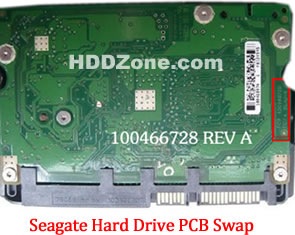
For Seagate HDD, just need the donor PCB has the same board number as yours.

seagate-hard-drive-pcb-swap

* Seagate Hard Drive PCB Swap

2. Before Seagate Barracuda 7200.12 HDD PCB Swap you should know:

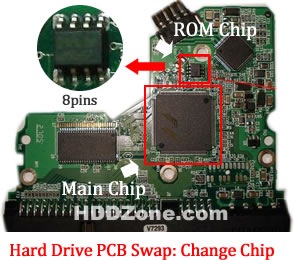
1. Most PCB’s BIOS chip(ROM Chip) store the unique information. We need change the BIOS form original PCB to replacement PCB, in order to make the replacement PCB compatible with the HDD.  The 8pins (4 pins on each sides) with 25P05VP、25P10VP、25F512、25F1024、25F1024AN、SST25VF512、SST25VF010, etc. are the BIOS Chip.

Tips: Most of the TV/Phone Repair Shop can offer these services for just $5-%20

hard-drive-pcb-swap-change-chip

* Hard Drive PCB Swap: Change BIOS Chip, Main Chip

2. Some PCB don’t have separate BIOS. The BIOS be integrated on the Main Controller IC(The biggest chip on the board, also named Main Chip). We should exchange the Main Controller IC to let the HDD be recognized.

3. Where to buy Seagate Barracuda 7200.12 PCB Circuit Boards?

Seagate 100517995 PCB
Seagate 100629241 PCB
Seagate 100611782 PCB
Seagate 100616260 PCB
Seagate 100617476 PCB
Seagate 100546571 PCB
Seagate 100608206 PCB
Seagate 100602819 PCB
Seagate 100656494 PCB
Seagate 100619454 PCB
Seagate 100589569 PCB
Seagate 100595933 PCB
Seagate 100611023 PCB
Seagate 100645422 PCB
Seagate 100653600 PCB
Seagate 100603470 PCB
Seagate 100513586 PCB
Seagate 100573971 PCB
Seagate 100603204 PCB
Seagate 100591286 PCB
Seagate 100583883 PCB
Seagate 100557583 PCB
Seagate 100533173 PCB
Seagate 100579470 PCB
Seagate 100536501 REV A PCB
Seagate 100535537 PCB
Seagate 100574451 PCB
Seagate 100550361 REV A PCB
Seagate 100535704 PCB
Seagate 100536501 REV A PCB
Seagate 100532367 PCB
Seagate 100535537 PCB

Note: Seagate Barracuda 7200.12 PCB sells on HDDZone.com are fully tested before shipment(worldwide free shipping now!); These are just PCB (Printed Circuit Boards), not the whole HDD (Hard Disk Drive).

More other pcb swap guide please refer to this post: hard Drive PCB Swap

Read More

Western Digital PCB Buying Guide (SATA)

As we know:  Western Digital HDD can’t spin; board/chip be burnt; interface broken; etc. These problems are caused by PCB malfunction. Swap PCB of your Western Digital SATA hard drives can resolve the problems.

1. Western Digital Hard Drives PCB Buying Guide (SATA):

For Western Digital HDD pcb swap needs,  you just need the donor PCB has the same pcb board number(2060-701265-001) as yours.

western-digital-pcb-buying-guide

One thing you should know before this purchasing: Most PCB’s BIOS chip(ROM Chip) store the unique information. We need change the BIOS form original PCB to replacement PCB, in order to make the replacement PCB compatible with the HDD.  The 8pins (4 pins on each sides) with 25P05VP、25P10VP、25F512、25F1024、25F1024AN、SST25VF512、SST25VF010, etc. are the BIOS Chip. LocalTV/Phone Repair Shop can offer these services for $5-%20.

2. Where to buy these Western Digital PCB circuit boards?

Western Digital PCB 2060-771702-001
Western Digital PCB 2060-771590-001
Western Digital PCB 2060-701477-001
Western Digital PCB 2060-771640-002
Western Digital PCB 2060-771577-001
Western Digital PCB 2060-771698-002
Western Digital PCB 2060-701640-006
Western Digital PCB 2060-771640-003
Western Digital PCB 2060-701640-005
Western Digital PCB 2060-771668-000
Western Digital PCB 2060-771642-000
Western Digital PCB 2060-701640-007
Western Digital PCB 2060-701567-000
Western Digital PCB 2060-701640-000
Western Digital PCB 2060-701640-001
Western Digital PCB 2060-701640-002
Western Digital PCB 2060-771642-001
Western Digital PCB 2060-701590-001
Western Digital PCB 2060-701563-000
Western Digital PCB 2060-701520-000
Western Digital PCB 2060-701310-004
Western Digital PCB 2060-701537-004
Western Digital PCB 2060-701383-001
Western Digital PCB 2060-701384-002
Western Digital PCB 2060-701453-000
Western Digital PCB 2060-701293-001
Western Digital PCB 2060-701393-002
Western Digital PCB 2060-701444-003
Western Digital PCB 2060-701444-004
Western Digital PCB 2060-701477-002
Western Digital PCB 2060-701537-003
Western Digital PCB 2060-701552-003
Western Digital PCB 2060-701577-001
Western Digital PCB 2060-701590-000
Western Digital PCB 2060-701335-003
Western Digital PCB 2060-701335-005
Western Digital PCB 2060-701310-003
Western Digital PCB 2060-001293-000
Western Digital PCB 2060-001252-000
Western Digital PCB 2060-701537-002
Western Digital PCB 2060-001293-001
Western Digital PCB 2060-701335-002

Note: Western Digital PCB sells on HDDZone.com are fully tested before shipment(worldwide free shipping now!); These are just PCB (Printed Circuit Boards), not the whole HDD (Hard Disk Drive).

More other pcb swap guide please refer to this post: hard Drive PCB Swap

Read More

How to resolve NTFS Partitions Problems

ntfs-partitions The first sector of NTFS partitions is used as the partition boot sector. It contains the information which allows the OS to read the partition. Without it, the partition cannot be accessed.

NTFS has a backup copy of the boot sector on the last sector of the partition which can allow recovery programs to restore it. The FAT also has the boot sector, and resides on the first sector of this partition. The difference is that FAT does not have a backup copy of this information; Recovery is much more difficult than NTFS.

The first file stored on an NTFS partition is called the Master File Table (MFT) which is essentially a listing of the names, properties and locations of all the other files in this partition. This is referenced by the operating system to access individual files.

NTFS stores a backup copy of this file. Data restoration software can access or restore a copy of the MFT in order to access files on the partition.

FAT partitions with something similar, called predictably enough the File Allocation Table (FAT). The FAT is also backed up on the disk, and can be restored by software. The major disadvantage of the FAT as compared to the MFT is that it needs to be located on a specific area of the partition to function, so if that area of the disk is damaged, recovery will become more difficult.

When a file is deleted (removed from the recycle bin within Windows), both file systems simply mark the file as deleted. The data is not actually removed from the hard drive, but rather the space it takes up on the disk is now considered to be free. Consequently, if you delete a file accidentally, you have an excellent chance of being able to restore it provided you do not write more information to the disk.

For example, If you two NTFS partitions on the effected disk. When you ran FDISK, it wrote garbage information over certain areas of this disk, including areas of both partitions. As a result, the first partition (the one with your article on it) had lost its partition boot sector, meaning it could not be accessed normally by an operating system. The second partition had merely had crucial system files overwritten, and was unbootable, but still can accessible once you transferred the disk to another computer.

There is a way to fix all of this, and get the data back

One rule to remember when you have lost data, please don’t write anything more to the affected hard drive!

If you have deleted a partition by accident, do not create another partition, just leave it blank.
If you have deleted files from the recycling bin that you realize you need, do notsave anything to the drive. The reason is that hard drives do not actually erase anything, not data or partitions. When you erase a file from the operating system, it is just marked on the drive as having been deleted. When the system needs to store more data on the drive, it will consider files on the drive marked ‘deleted’ as being empty space, and cheerfully copy over them. If that happens then you’re in big trouble.

Another rule applies twice over for partitions; since partition information just presents the operating system with a way of addressing the space available on the drive. If you wipe out a partition everything from it will seem to be gone.

If there is no partition information, no data can be read by the operating system. This does not mean that your data it is not there however, only that means you can’t see it. Data-recovery programs have no such handicap.

What you need to do was to allow FDISK to test the integrity of the drive, which it does by writing a pattern of data to certain areas. Of course, in the case, many of these areas contained partition information and critical system files. The result was one missing partition, due to a destroyed boot sector, and one unbootable (but still readable) XP installation.

How.
First and best thing to do in a data-loss situation is to make sure no more data is written to the drive. Obviously, if you have just the one partition and it’s fried, you can’t boot normally to the operating system. The best option in this situation is to transfer the drive to another computer, preferably one using the same file-system as your damaged partition (such as, the same operating system, or a newer version). See the PCSTATS Beginners Guides sectionfor information on how to move your hard drive to another computer.

Transferring the HDD to another computer has the dual benefit of preventing the drive from being written to accidentally, and potentially allowing you to retrieve information from the disk just by using Windows Explorer to look through file structures.

If you have damaged or erased essential operating system files, but the partition information is still intact Windows will not boot. The HDD can still be read from a different operating system which is one way out of the doom and gloom.

All the processes described from here on are strictly for resolving software issues with your data, like accidentally deleting partitions or files. If your hard drive has a physical problem, if it is making strange noises, shaking, rattling or smoking, nothing here will apply. Turn off your computer, unplug the drive and call a data recovery service if your data are vital.

Read More

Western Digital PCB Buying Guide (IDE)

As we know:  Western Digital HDD can’t spin; board/chip be burnt; interface broken; etc. These problems are caused by PCB malfunction. Swap PCB of your Western Digital hard drives can resolve the problems.

1. Western Digital Hard Drives PCB Buying Guide (IDE):

For Western Digital HDD pcb swap needs,  you just need the donor PCB has the same pcb board number(2060-701265-001) as yours.

western-digital-hard-drive-pcb-swap

One thing you should know before this purchasing: Most PCB’s BIOS chip(ROM Chip) store the unique information. We need change the BIOS form original PCB to replacement PCB, in order to make the replacement PCB compatible with the HDD.  The 8pins (4 pins on each sides) with 25P05VP、25P10VP、25F512、25F1024、25F1024AN、SST25VF512、SST25VF010, etc. are the BIOS Chip. LocalTV/Phone Repair Shop can offer these services for $5-%20.

2. Where to buy these Western Digital PCB circuit boards?

Western Digital PCB 2060-701596-001
Western Digital PCB 2060-001113-001
Western Digital PCB 2060-001092-007
Western Digital PCB 2060-001092-006
Western Digital PCB 2060-001127-003
Western Digital PCB 2060-001076-002
Western Digital PCB 2060-001062-004
Western Digital PCB 2060-001047-001
Western Digital PCB 2060-001100-003
Western Digital PCB 2060-701494-001
Western Digital PCB 2060-701552-002
Western Digital PCB 2060-001068-001
Western Digital PCB 2060-001092-006
Western Digital PCB 2060-001113-001
Western Digital PCB 2060-001129-001
Western Digital PCB 2060-001179-003
Western Digital PCB 2060-701265-001
Western Digital PCB 2060-701292-000
Western Digital PCB 2060-701292-001
Western Digital PCB 2060-701292-002
Western Digital PCB 2060-001130-012
Western Digital PCB 2060-701508-001
Western Digital PCB 2060-701494-002
Western Digital PCB 2060-001130-010
Western Digital PCB 2060-001128-005
Western Digital PCB 2060-001266-001
Western Digital PCB 2060-001266-000
Western Digital PCB 2060-001265-001
Western Digital PCB 2060-001189-003
Western Digital PCB 2060-001177-000
Western Digital PCB 2060-001175-000
Western Digital PCB 2060-001173-004
Western Digital PCB 2060-001159-006
Western Digital PCB 2060-001292-000

Note: Western Digital PCB sells on HDDZone.com are fully tested before shipment(worldwide free shipping now!); These are just PCB (Printed Circuit Boards), not the whole HDD (Hard Disk Drive).

More other pcb swap guide please refer to this post: hard Drive PCB Swap

Read More

Hard Drive Data Recovery

If you use a HDD with a decent amount of time, there is a good chance someone has told you that data stored on the HDD is not exactly safe. It is definitely true.

The fact that unlike tapes or CDs or other methods of storage, hard drives are mechanical, active devices and are thus subject to comparatively rapid breakdown.

The real threats to hard drives are the people who use them. Working as a computer tech during the glory days of Windows XP, you get rather used to using FDISK and other hard drive utilities to prepare and repair customer’s drives, which leads to certain over confidence.

Picture this if you will; there are two or three sentences and a screen shot away from finishing a 5000+ word article on computer upgrades. All we should do was fire up FDISK on a dual boot Windows PC system and grab a few screen shots. Write a little blurb on how to partition a drive, making sure to tell the readers not to mess with FDISK if they were not sure what they were doing…

Anyway, wanted to get some more screen shots of the actual partitioning screen, but you did not have a blank hard drive handy. You can use my NTFS formatted XP drive (which FDISK perceived as a blank drive) to start the “process,” grab the screen shots and then cancel the partitioning.

Except for one little thing
FDISK, in the process of checking the disk before it prompts you for the size of the partition, writes information to certain areas of the hard drive. This data writes over whatever might have been there before. Meanwhile, there I was, watching the ‘%complete’ counter and wondering why a little red warning flag kept going off in brain? Restarted WinXP and waited for it to boot, and waited… and waited…

The hard drive that suffered the data loss was a 1TB Hitachi drive with two 5Gb XP NTFS partitions (Home and Professional) and 6Gb of unused space. Both XP partition were unbootable after the incident.

After transferring the drive to a Windows 2000 computer, then use disk manager, (to load disk manager on XP or 2000, right click ‘my computer’ select ‘manage’ then ‘disk manager’) this is what I saw.

The Primary partition where my 5000+ word article was saved, is seen as unformatted and cannot be read by the OS. The second XP partition could not be booted, but was seen as formatted and I could transfer files easily from it using explorer.

Read More

Maxtor DiamondMax Plus 9 PCB Circuit Boards

Maxtor DiamondMax Plus 9 PCB Circuit Boards Swap/Replacement for Data Recovery Needs.

Maxtor DiamondMax Plus 9 PCB Hello! Do you have a PCB in stock that will work with my specifications?
MAXTOR DIAMONDMAX 9 120GB
Code: YAR41BW0
Model: 6Y120P0-131211
Chip: Ardent C5-C1 040111500
An 8-pin chip is PRESENT at the opposite end of board from the connectors.

I believe this is the PCB board is the one that I need but I can’t locate
“motor combo #”.  Maxtor 040111300 DiamondMax Plus 9 PCB
Maxtor ARDENT C8-C1 040111300 DiamondMax Plus 9 PCB
Main Controller IC: ARDENT C8-C1 040111300
HDD Motor Combo IC: L7250E 1.2

I have a Maxtor 0401115000 DiamondMax Plus 9, my question is that you have has a HDD Motor Combo IC: L7250E 1.2, On my drive it
is L7250E 1.0, Are they compatible, and will they interchange? I do know
that this would be my gamble but I would like to know as much as possible
before putting out the money. Thank you, Clyde.

Im trying to get a replacement board for my Maxtor DiamondMax Plus 9 – 80 Gb
The closest I can find is;
Maxtor Ardent C5-C1 040111500 DiamondMax Plus 9 PCB
Main Controller IC: Ardent C5-C1 040111500
HDD Motor Combo IC: L7250E 1.2
Everything else matches but the HDD Motor Combo IC on mine is;
HDD Motor Combo IC: L7250E 1.0
Will this make a difference or will I still be able to use the board
available from you to retrieve the data on this disk?
Many thanks

Order Maxtor DiamondMax Plus 9 PCB on HDDZone.com with worldwide free shipping.

Read More

Hard Drive PCB Swap

HDD can’t spin; board/chip be burnt; interface broken; etc. These problems are caused by PCB malfunction. Swap PCB can resolve the problems.

The probability of HDD’s other problems are unlikely caused by PCB’s fault. Such as: HDD can spin, but can’t be recognized; HDD can be recognized correctly but will report a size of 0 bytes; HDD report SMART errors on boot, etc.

If your HDD’s problem is caused by PCB malfunction, you need swap PCB.

1. How to find a matching PCB

For Seagate HDD/Western Digital HDD/Samsung HDD, just need the donor PCB has the same board number as yours.

seagate-hard-drive-pcb-swap

* Seagate Hard Drive PCB Swap

western-digital-hard-drive-pcb-swap

* Western Digital Hard Drive PCB Swap

samsung-hard-drive-pcb-swap

* Samsung Hard Drive PCB Swap

For Maxtor PCB, just need the donor PCB has the same Main Controller IC as yours.

maxtor-hard-drive-pcb-swap

* Maxtor Hard Drive PCB Swap

For Hitachi PCB If the PCB is Hitachi PCB, 3.5″ PCB, please send your PCB’s photo (the side with chips) to us. We need to check it shape. Also please advise the number on the Main Controller IC, as below photo:

hitachi-3.5-inch-hard-drive-pcb-swap

* Hitachi 3.5′” Hard Drive PCB Swap

Hitachi 2.5″ PCB, Please offer the first two lines numbers on the white label, as the below photo:

hitachi-2.5-inch-hard-drive-pcb-swap

* Hitachi 2.5′” Hard Drive PCB Swap

2. Before PCB Swap you should know:

1. Most PCB’s BIOS chip(ROM Chip) store the unique information. We need change the BIOS form original PCB to replacement PCB, in order to make the replacement PCB compatible with the HDD.  The 8pins (4 pins on each sides) with 25P05VP、25P10VP、25F512、25F1024、25F1024AN、SST25VF512、SST25VF010, etc. are the BIOS Chip.

Tips: Most of the TV/Phone Repair Shop can offer these services for just $5-%20

hard-drive-pcb-swap-change-chip

* Hard Drive PCB Swap: Change BIOS Chip, Main Chip

2. Some PCB don’t have separate BIOS. The BIOS be integrated on the Main Controller IC(The biggest chip on the board, also named Main Chip). We should exchange the Main Controller IC to let the HDD be recognized.

3. How to change PCB’s BIOS/Main Chip:

hard-drive-pcb-rom-main-chip-swap-tool

* Hard Drive PCB ROM/Main Chip Swap Tool

change-hard-drive-rom-bios-chip

* Remove the ROM chip from the original pcb

hard-drive-rom-bios-chip-removed

hard-drive-rom-bios-chip-swap

* Solder the ROM chip to the replacement pcb

Note: Chang Main Controller IC is similar as change BIOS. Need you have more patience and do it more carefully. If you think these operations are too difficult, you can find your local AV/TV repair shop help you.

5. Hard Drive PCB Supplier:

HDDZone.com (Seagate, Western Digital, Samsung, Maxtor PCB Boards with free shipping)

Read More

Kroll Ontrack launches Ontrack Data Recovery Portal

krollontrack_logo Data recovery vendor, Kroll Ontrack, recently launched its free Ontrack data recovery portal, which offers a paperless service for partners.

“We were developing it for the US market but the shortage of education on this matter led us to roll it out here in Australia. It gives the ability for the partner to log jobs through the online portal and they can open up a job, send in a device for recovery, and watch its progress,” Kroll Ontrack Asia-Pacific general manager, Adrian Briscoe said.

Briscoe mentioned that introducing the portal has made its partners more self-serving, eliminating the need to call in and speak to its consultant. Onsite computer service provider and Kroll Ontrack Australian partner, Geeks2U managing director, David Hancock, said that the portal has enabled its business to manage its customers’ data recovery needs independently.

This portal is an added service to its data recovery certified partner program, launched in May 2011, that offers partners with training and informational materials and access to its data recovery methodology.

Through the certified partner program, the company has already registered more than 245 certified partners across A/NZ, and intends to grow that base to 270 partners, Briscoe claimed.

In further educating the market, Kroll Ontrack launched a data recovery awareness campaign to dispel data recovery myths.

He said that the campaign aims to help consumers and organisations with selecting a data recovery service that is right for their needs and helps protect their data from future loss.

“Data recovery myths can be disproved with the right technology, technical know-how and approach to service,” Briscoe said.

The top five data recovery myths include:

  • The most inexpensive data recovery quote will result in the same outcome as the other quotes
  • Not experiencing a significant data loss means a business does not require a data recovery plan
  • In the event of a data loss situation, a company’s IT department can handle it
  • Data recovery is not possible in some situations and for some technologies
  • Due to the nature of their business, all data recovery companies know how to keep a company’s data safe

More information on these myths can be accessed from www.krollontrack.com/data-recovery/myths/

Read More