
BartPE is a discontinued tool that creates a lightweight, graphical Windows pre-installation environment from a legitimate Windows XP or Windows Server 2003 installation CD. It runs entirely from a bootable CD or USB drive, allowing users to start a computer even when the primary operating system fails to boot. It is essentially a portable, temporary Windows system that operates independently of the hard drive’s installed OS.
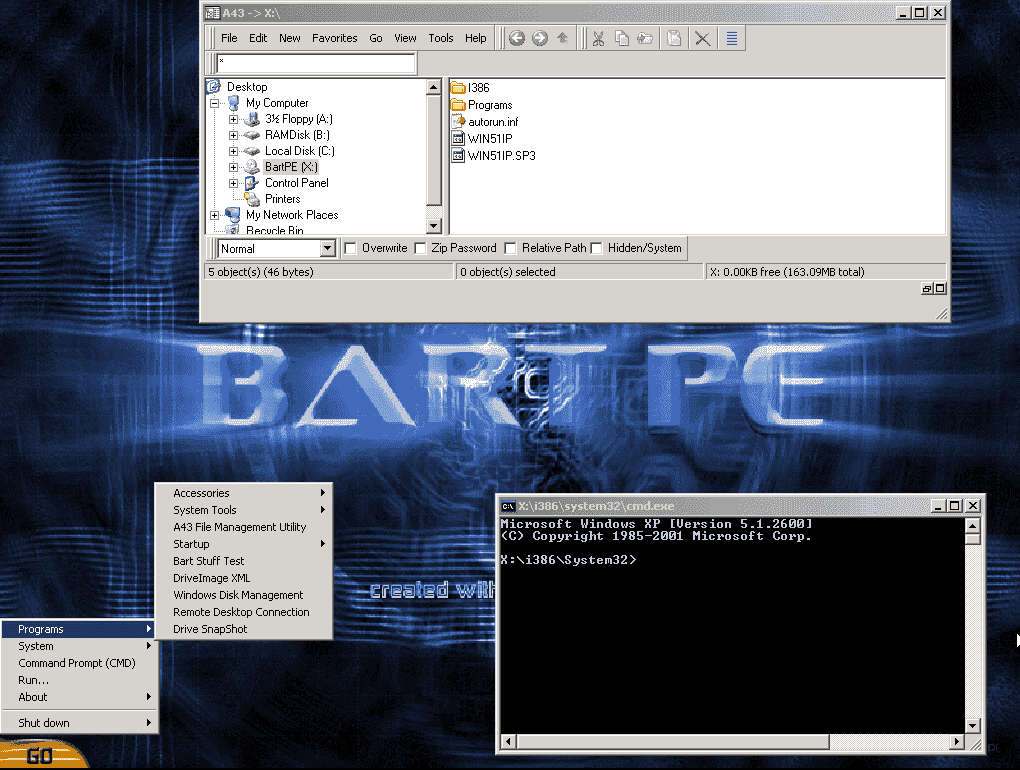
Core Capabilities
Once booted into BartPE, users can perform several critical recovery and maintenance tasks:
- Data Recovery: Copy important files from a non-booting hard drive to external storage or network locations.
- Password Reset: Reset or clear the local administrator password for Windows XP/2003 installations.
- Virus and Malware Removal: Run offline antivirus scanners to clean infections that are active in the main OS.
- System Diagnosis: Use built-in or third-party diagnostic tools to test hardware components like memory and hard disks.
- Offline Registry Editing: Modify the registry of the offline Windows installation to fix boot issues.
Technical Overview
BartPE is built using a companion application called PE Builder. This program extracts and compresses files from the original Windows XP/2003 installation media, adding a graphical shell and basic system services. The resulting environment runs entirely in system memory (RAM), meaning it does not write anything to the hard disk unless explicitly instructed. This makes it safe for use on drives with potential filesystem corruption.
One of BartPE’s notable features is its plugin architecture. Users can add third-party applications by placing plugin files in the appropriate directories before building the ISO. Common plugins included backup software, disk imaging tools, network drivers, and file managers.
Key Limitations and Challenges
Despite its usefulness, BartPE has several significant drawbacks:
- Hardware Support: Because it is based on the Windows XP kernel, it lacks native support for modern hardware, including SATA controllers, NVMe drives, USB 3.0 ports, and UEFI firmware. To recognize hard drives, users often had to manually integrate mass storage drivers during the build process.
- Driver Integration Complexity: Adding network or storage drivers was not automatic. It required editing configuration files and providing the correct INF files, which was challenging for less experienced users.
- Licensing Requirement: BartPE must be built using a genuine Windows XP/2003 CD. It cannot be distributed separately, and Microsoft raised concerns about its copyright implications.
- Discontinued Status: Development of BartPE ceased many years ago. It is not updated to support newer Windows versions or security patches, making it obsolete for contemporary use.
Comparison with Modern Alternatives
For any computer built in the last decade, modern PE tools are vastly superior. Here is how BartPE compares to current solutions like Win10XPE or PhoenixPE:
| Feature | BartPE | Modern PE Tools (Win10XPE, PhoenixPE) |
|---|---|---|
| Base Kernel | Windows XP / Server 2003 | Windows 10 or Windows 11 |
| Development Status | Discontinued, no updates | Actively maintained |
| UEFI and Secure Boot Support | No | Yes |
| NVMe and USB 3.0 Support | No, requires manual driver injection | Native support |
| Driver Integration | Manual and complex | Automated or scripted |
| Software Ecosystem | Outdated plugins | Active community, modern tools |
Legacy Use Cases
Today, BartPE is only relevant for very old systems running Windows XP or Server 2003, especially in legacy industrial or embedded environments. It can still serve as a recovery tool for those specific machines if a working CD drive is available. However, for almost all practical purposes, modern PE builders or even lightweight tools like Rufus and Ventoy are recommended for installation and recovery tasks.
Important Usage Notes
- BartPE does not support Windows Vista or any later operating system as a source.
- The boot process can be slow on older hardware because the environment loads into RAM.
- Any changes made within BartPE are lost upon reboot unless explicitly saved to persistent storage.
- Some OEM-branded Windows CDs may require additional files to work properly with PE Builder.
Publisher Website: http://www.nu2.nu/